Hubdoc vs Spendifique: Which Is Better for Bookkeepers?
Bookkeepers looking for receipt capture and expense automation often encounter Hubdoc, especially if they already use Xero.
However, as bookkeeping workflows evolve and document volumes increase, many firms begin evaluating alternative tools that offer stronger extraction accuracy, better automation, and more efficient batch processing.
Two tools commonly compared are Hubdoc and Spendifique.
Both help collect receipts and invoices, extract data, and push transactions into accounting software. But their approach to automation, workflow design, and pricing differs significantly.
What Is Hubdoc?
Hubdoc is a document collection and data extraction tool widely used by accountants and bookkeepers.
It allows users to:
- Upload receipts and invoices
- Forward documents via email
- Extract key financial data
- Publish transactions into accounting systems
Hubdoc became especially popular after being acquired by Xero and later included in certain Xero subscription plans.
Because of this integration, many Xero users begin using Hubdoc as their default document collection tool.

What Is Spendifique?
Spendifique is an AI-powered expense capture and expense-to-accounting-entry automation platform designed specifically for small bookkeeping firms managing multiple clients.
The platform focuses on:
- automated receipt collection
- AI-powered data extraction
- structured batch processing
- multi-client bookkeeping workflows
Spendifique integrates directly with:
- QuickBooks Online
- Xero
Unlike broader document management tools, Spendifique focuses specifically on improving the efficiency of expense processing for bookkeepers.

Data Extraction Accuracy
One of the biggest differences between the two platforms is extraction quality.
Hubdoc
Hubdoc extracts key invoice fields such as:
- vendor name
- invoice date
- total amount
However, many bookkeepers report that extraction accuracy can vary depending on the document format.
In addition, processing times can sometimes take longer because documents are queued before extraction.
For some workflows this delay can interrupt bookkeeping review processes.
Spendifique
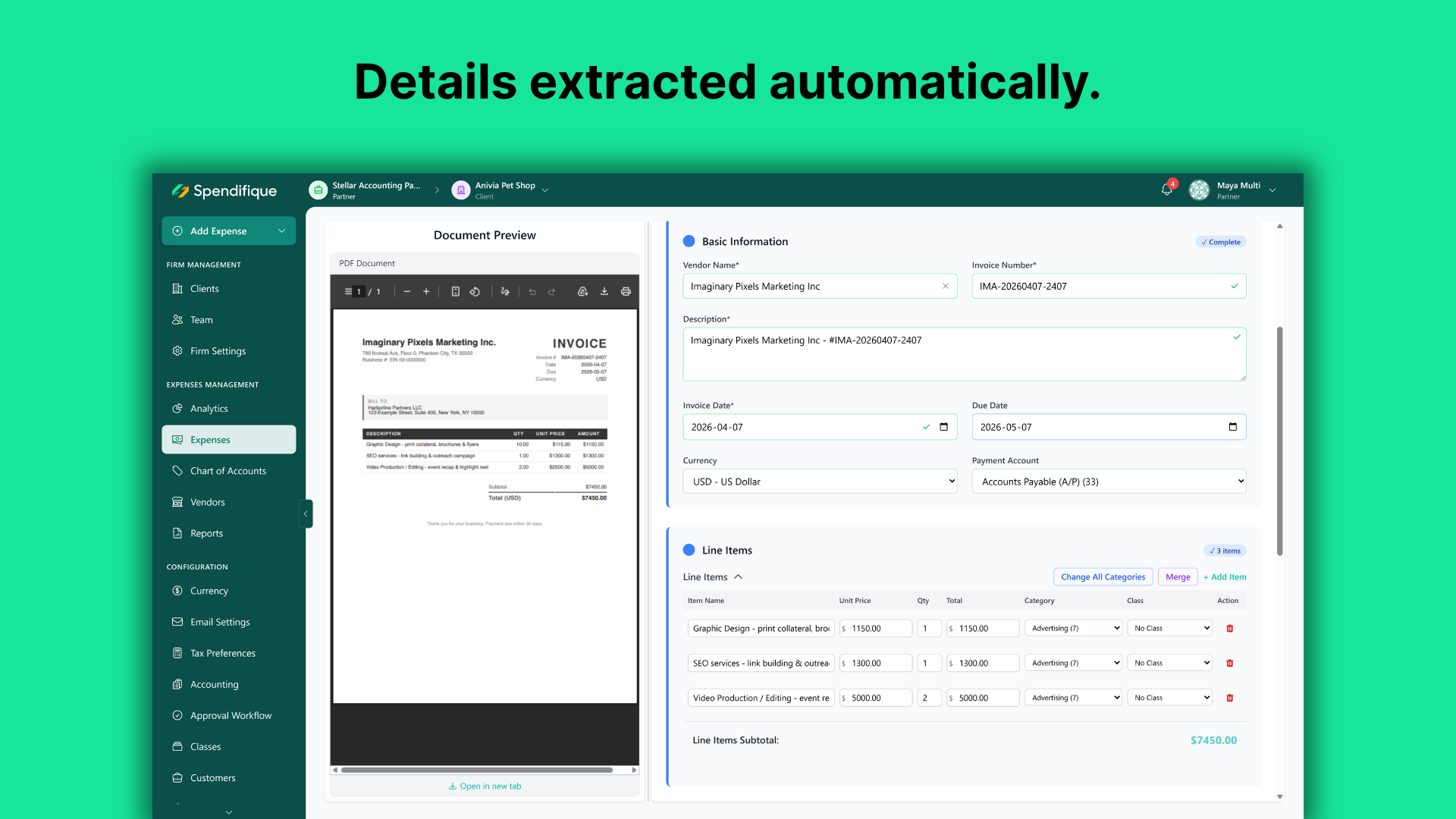
Spendifique uses AI-based extraction designed specifically for expense workflows.
Key capabilities include:
- automatic extraction of all line items
- unlimited multi-line invoice extraction
- vendor-based categorization rules
- duplicate invoice detection
For example, if a Costco invoice contains 25 line items, Spendifique extracts all 25 items automatically.
This significantly reduces the amount of manual review required for complex invoices.
Multi-Invoice PDF Handling
Many suppliers send multiple invoices inside a single PDF.
Handling these documents efficiently is important for bookkeepers processing high volumes of expenses.
Hubdoc
Hubdoc supports multi-page documents and allows users to split documents into separate invoices.
However, this process typically requires the user to manually specify which pages belong to each invoice when uploading or forwarding documents.
Spendifique
Spendifique automatically detects when a PDF contains multiple invoices.
The system:
- identifies the invoice boundaries
- suggests the split
- asks the user to quickly confirm
This confirmation workflow allows multiple invoices to be processed in seconds.
Receipt Collection Methods
Both platforms support multiple ways for clients to submit documents.
Hubdoc
Users can submit documents through:
- mobile uploads
- email forwarding
- file uploads
- automated vendor document fetching
Hubdoc can automatically retrieve documents from some banks and vendor portals.
Spendifique
Spendifique supports:
- mobile receipt scanning
- photo upload from mobile devices
- email forwarding
- drag-and-drop upload via web app
Instead of vendor document fetching, the platform focuses on simplifying receipt submission and processing workflows.
Batch Processing & Bookkeeping Workflow
Hubdoc focuses primarily on document storage and extraction.
Spendifique places heavier emphasis on batch bookkeeping workflows.
Hubdoc
Typical workflow:
- Upload document
- Wait for extraction
- Review document individually
- Publish to accounting software
Spendifique
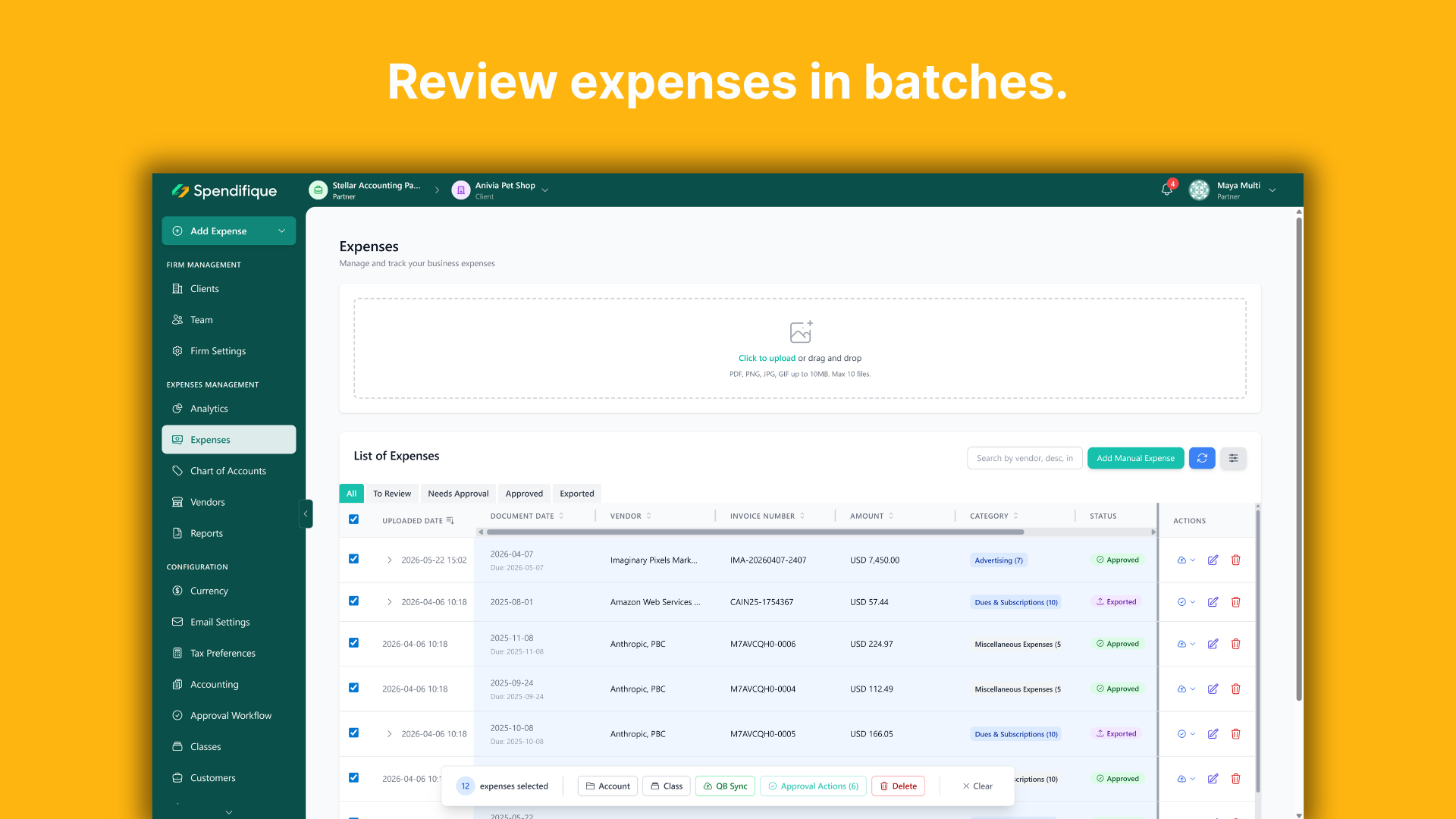
Spendifique allows bookkeepers to:
- batch edit expense categories
- batch upload transactions
- automate vendor categorization
- process invoices faster across multiple clients
These features are designed to reduce repetitive work when managing multiple bookkeeping clients.
Multi-Client Firm Management
Hubdoc
Hubdoc provides a Partner Portal that allows accounting firms to manage multiple client accounts and access documents across organizations.
The Partner Portal is primarily designed for client account management and document access.
Spendifique
Spendifique includes a firm dashboard designed for bookkeeping practices.
Features include:
- switching between clients
- assigning clients to team members
- managing firm subscriptions
- centralized access for bookkeeping teams
This structure is particularly useful for bookkeeping firms managing between 1 and 30 clients.
Pricing Structure
Hubdoc
Hubdoc is often included in certain Xero subscription plans.
This makes it an attractive option for firms already operating entirely inside the Xero ecosystem.
However, firms using other accounting platforms may need to evaluate additional tools depending on their workflow requirements.
Spendifique
Spendifique uses a flexible pricing model.
Paid subscriptions include:
- unlimited document scans
- unlimited line item extraction
- unlimited invoice processing
There are no add-on fees tied to document volume.
For new users, Spendifique also offers:
- a free account with 30 scans
- pay-as-you-go scanning at $0.50 per scan after free credits
This structure allows bookkeepers to scale usage without worrying about extraction limits.
Side-by-Side Comparison
When Should You Choose Hubdoc?
Hubdoc may be a good option if:
- you already use Xero
- you want automatic document fetching
- you need simple receipt storage
When Should You Choose Spendifique?
Spendifique may be a better fit if:
- you manage multiple bookkeeping clients
- you process invoices with many line items
- you want faster batch processing
- you want predictable pricing without document limits

Conclusion
Hubdoc remains a useful tool for collecting documents within the Xero ecosystem.
However, bookkeeping firms that require stronger extraction accuracy, unlimited line item processing, and batch expense automation may benefit from a more specialized solution.
Spendifique was built specifically to streamline expense processing for bookkeeping firms managing multiple clients.
For firms looking to reduce manual work and improve efficiency, it offers a focused Hubdoc alternative designed around modern bookkeeping workflows.