
Your bookkeeping documents, organized automatically
Automatically split multi-invoice PDFs, rename files using invoice details, and organize receipts and invoices into folders by document type, fiscal year, and vendor. Keep everything backed up to Google Drive or OneDrive.
Get started free
Split invoices, not pages.
Upload one PDF with several invoices and Spendifique turns it into separate documents, each with its own extracted details.
Every invoice, separated automatically
Spendifique finds where each invoice starts and ends, keeps multi-page invoices together, and processes every invoice on its own.
Try our free invoice splitter →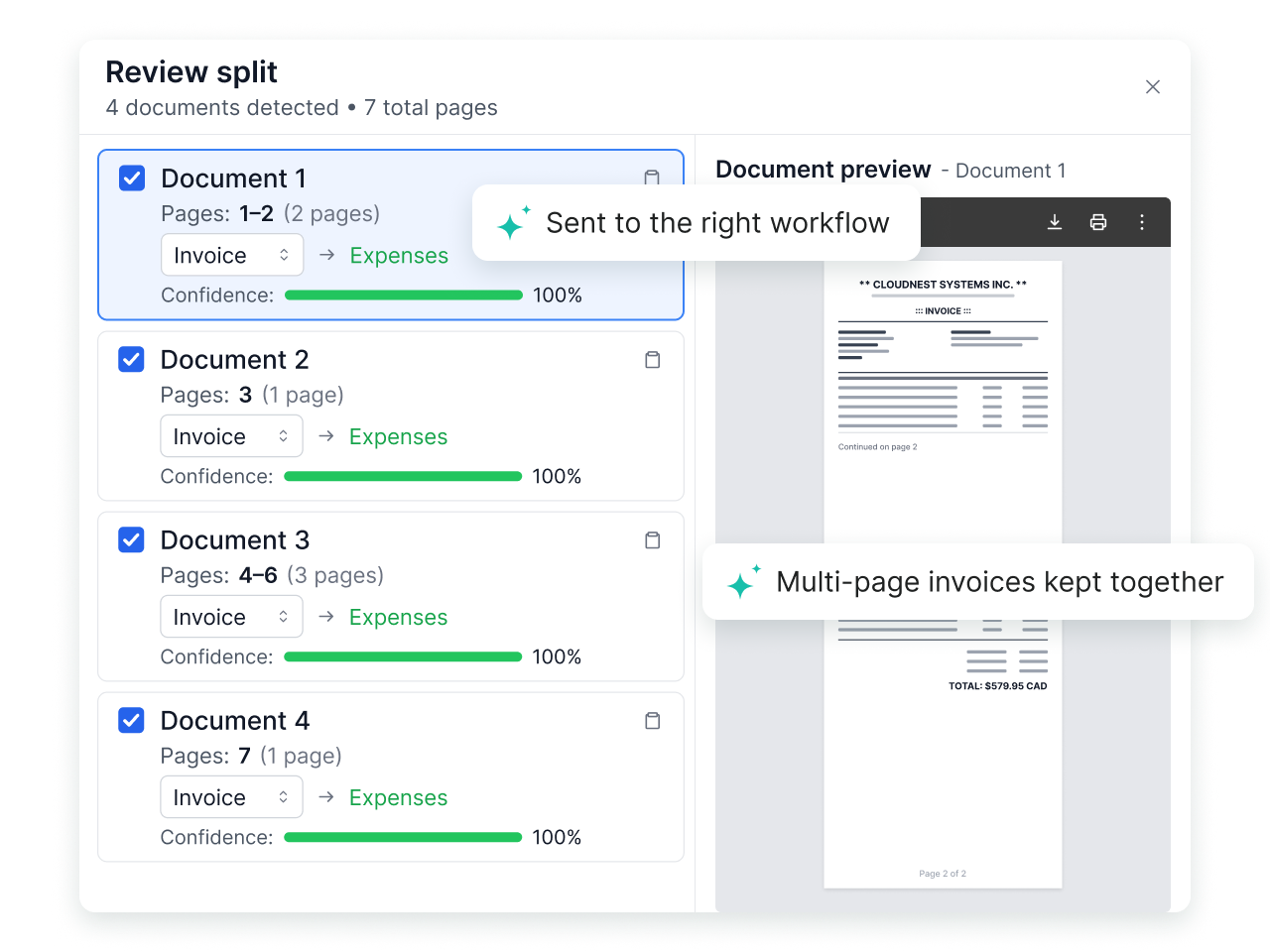
Every invoice, processed individually
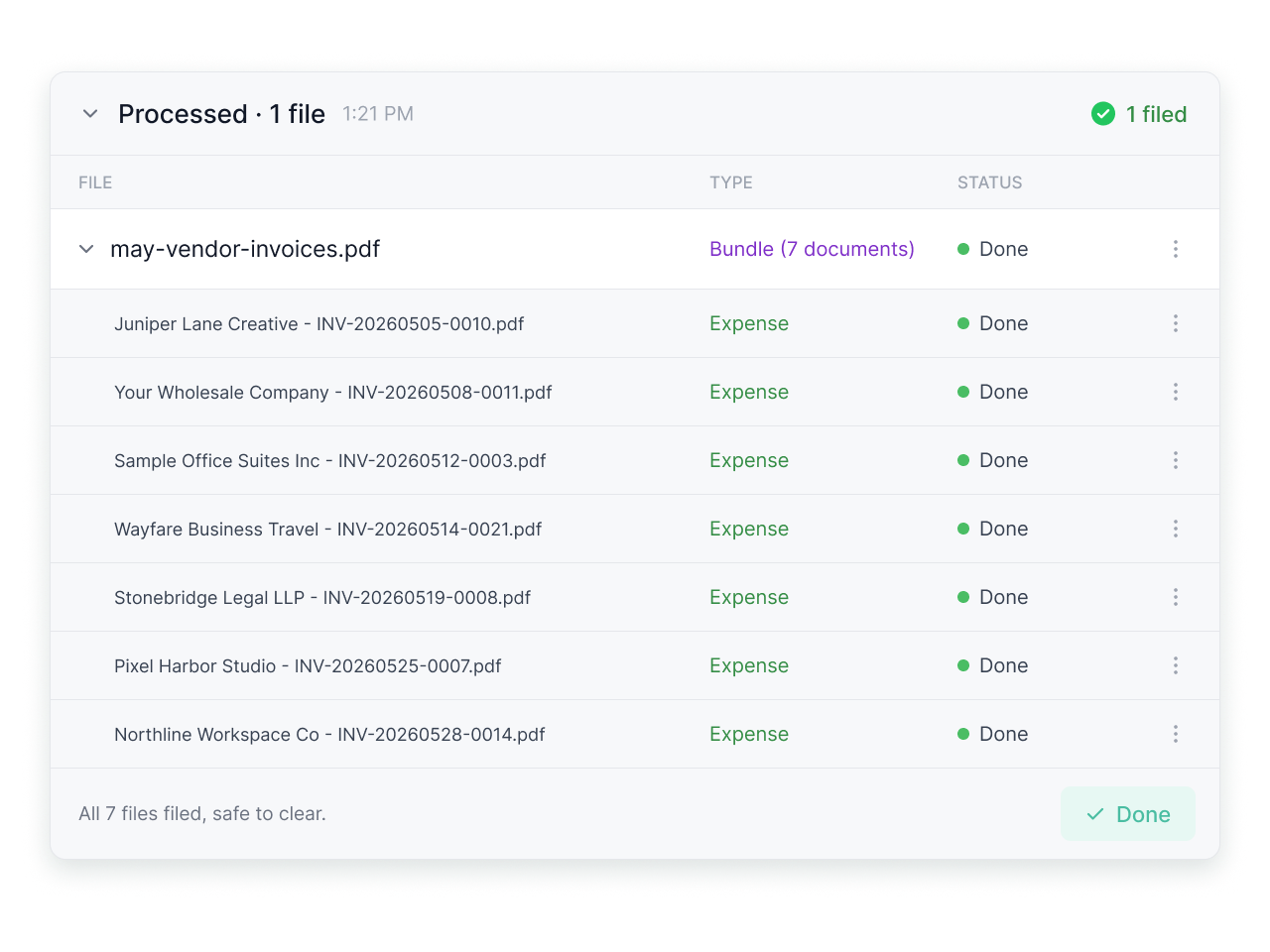
Once separated, Spendifique extracts the vendor, invoice number, date, amount, taxes, and individual line items from each invoice. Each document becomes a separate expense.
Your documents, filed where you need them.
Connect Google Drive or OneDrive to back up your invoices, receipts, and statements in folders organized by document type, fiscal year, and vendor.

Automatic backups, on your schedule
Processed receipts and invoices are copied to your own cloud storage, so your records never live only inside an app.

Rename with preset formats
Pick a naming format and every file follows it, using details like date, vendor and invoice number.

All your documents in one platform.
Keep invoices, receipts, and statements accessible in Spendifique. Manage your records, identify potential duplicates, and generate reports.
Everything organized
Keep your invoices, receipts, and statements organized and accessible in one place.

Generate reports in a few clicks
Create reports from your bookkeeping data and export them in CSV or PDF.

Spot duplicate invoices automatically
Duplicates are flagged before they reach your books.

One place for all your financial documents
Once a document is processed, it stays connected to the rest of your bookkeeping.
Line item extraction
Every line on the invoice is pulled out, with its description, amount and tax.
Inbox Sync
Connect your email to automatically collect new invoices as they arrive.
Statement matching
Match receipts to bank and card statements and see what's still missing.
Accounting integration
Sync to QuickBooks Online or Xero with the PDF attached, or export to Google Sheets.
Built for bookkeepers and small businesses
Bookkeepers & firms

From $16.50 / client / mo.
Spend less time sorting documents for multiple clients. Automatically split bundled invoices, keep files consistently named, and back up organized records to Google Drive or OneDrive.
Small businesses

From $8 / mo.
Keep your invoices and receipts organized without the manual filing. Let Spendifique split PDFs, rename documents, and automatically back up your files to Google Drive or OneDrive.
What our customers are saying
Real feedback from bookkeepers and small businesses using Spendifique every day.
What made me switch was the lack of minimum client requirements. I didn’t want to pay for 10 clients when I only had 4 active ones. The multi-invoice PDF detection has also been surprisingly useful: it asks for confirmation and then automatically splits documents, which saves me a lot of manual effort. The extraction accuracy is better than what I’ve used in Xero and Hubdoc. Turnaround time is fast, and the suggestions are usually correct.

Having no limits on scans or line items is a big win. I don’t have to worry about usage caps when clients upload a large batch of invoices. The multi-line extraction works well, even on more detailed invoices with lots of items. I also appreciate that vendor recognition improves over time, it genuinely feels like the system learns and becomes more accurate the more I use it.
Speed is what really stands out. I can upload an invoice and within seconds, it's categorized with the vendor and tax details already filled in. The centralized dashboard makes managing multiple clients much easier, especially when assigning work to team members.

The workflow is straightforward and doesn't try to do too much. Setting up new clients is fast, and the chart of accounts and vendor lists sync automatically. Clients find the interface easy to use too, which cuts down on back-and-forth.
Questions about document automation?
Yes. Spendifique automatically detects and separates individual invoices within a single PDF, even when an invoice spans multiple pages. Unlike basic PDF splitters, it splits by invoice rather than by page, keeping each document intact and ready for processing.
Yes. Spendifique uses extracted document details, including vendor name, date, invoice number, and amount, to automatically generate descriptive filenames. This helps keep your invoices and receipts consistently named and easier to identify.
Yes. When backing up documents to Google Drive or OneDrive, Spendifique offers multiple file naming presets. You can choose how details such as vendor name, date, invoice number, and amount appear in your filenames to keep your cloud archive organized.
Spendifique connects to Google Drive or OneDrive and automatically backs up your invoices, receipts, and statements. Documents are organized into folders by document type, fiscal year, and vendor, using your selected naming preset. You can schedule daily or weekly backups or archive documents manually.
Yes. Spendifique automatically flags potential duplicate invoices and receipts, helping you catch duplicate entries before they reach your books.
All Spendifique plans, including the free Basic plan, include automatic file renaming and Google Drive or OneDrive backups. The Basic plan supports PDF splitting for invoices and receipts, with 30 free scans and $0.50 per additional scan. All paid plans include unlimited scans and support splitting bank and credit card statements in addition to invoices and receipts. See our pricing page for Small Businesses and Bookkeepers for more details.
More questions?
Let your documents file themselves
Upload a PDF and watch every invoice get split, renamed and backed up to Google Drive or OneDrive.
Get started