
A DocuClipper alternative with unlimited scans
Scan unlimited receipts, invoices, and bank statements for less. Spendifique combines automated document collection, cross-currency transaction matching, and mileage tracking in one affordable platform.
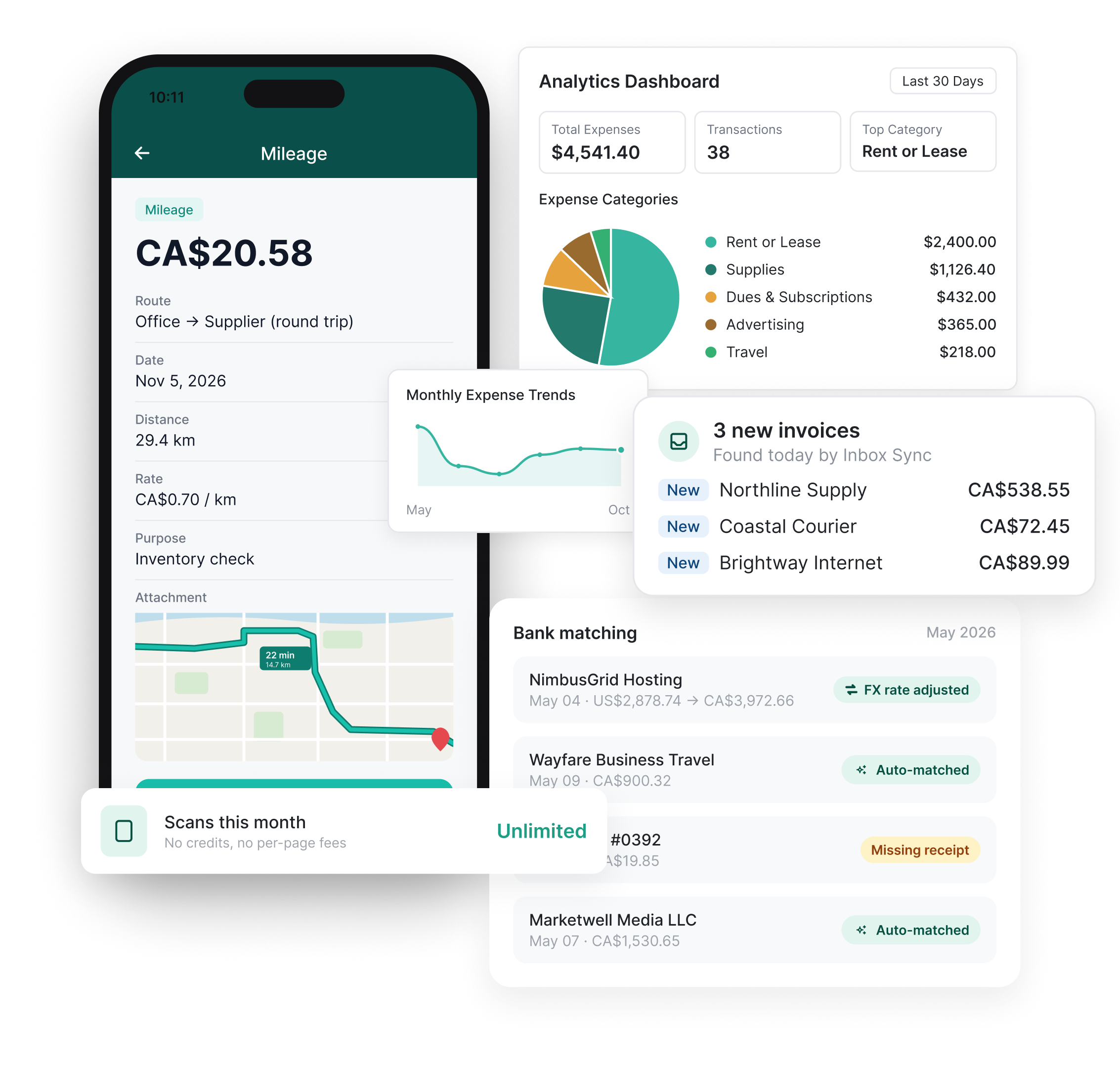
Simple pricing. Unlimited scanning
Unlike DocuClipper's page-based plans, Spendifique offers unlimited document scanning at a predictable price. Process as many receipts, invoices and bank statements as you need without tracking page allowances or upgrading as your document volume grows.
Spendifique
Unlimited document scanning
Business
Billed annually $264
Bookkeeper
From
Billed annually $198 per client
- Unlimited scans
- No page counting
- Volume discounts for firms
- Predictable monthly cost
DocuClipper
Page-based pricing
Starter
Business
Enterprise
Monthly equivalents, billed annually
Additional charges may apply when exceeding your page allowance.
Unlimited scanning
Process receipts, invoices and statements without counting pages.
Predictable costs
Your subscription stays the same, regardless of document volume.
Better value as you grow
Pay less per client as your bookkeeping practice grows.
Get more for $22/month
Feature
Spendifique Business $22/mo
DocuClipper Starter 120 ~$27/mo
Document scanning
Unlimited
120 pages/mo
Mobile receipt scanning
Included
Included
Bank statement extraction
Included
Included
AI line-item extraction
Included
Included
Bank transaction matching
Included
Included
Automatic foreign currency correction
Included
No, manual matching required
Inbox sync
Up to 2 years
No, forwarding only
Approvals
Included
Requires Business plan (from $111.30/month)
User roles & permissions
Included
Requires Business plan (from $111.30/month)
Mileage tracking
Included
No
Expense reimbursements
Included
No
Automated original document backup
Google Drive and OneDrive
No
Get unlimited document scanning, multi-step approvals, team management and advanced bookkeeping automation for just $22/month with Spendifique Business. No page limits or scanning overages.
More than a document converter
Spendifique goes beyond extracting financial data. Collect missing receipts, automate document organization, manage reimbursements and simplify your day-to-day bookkeeping, all in one place.
Find receipts in your email history
Unlike DocuClipper's email forwarding, Spendifique searches through up to two years of Gmail or Outlook history for invoices and receipts and automatically collects new documents daily.
Explore Inbox sync →
Match expenses across currencies
DocuClipper requires manual matching for foreign currency payments. Spendifique automatically identifies matches and adjusts expense amounts to reflect what was actually charged to your bank account.
Explore Bank statement matching →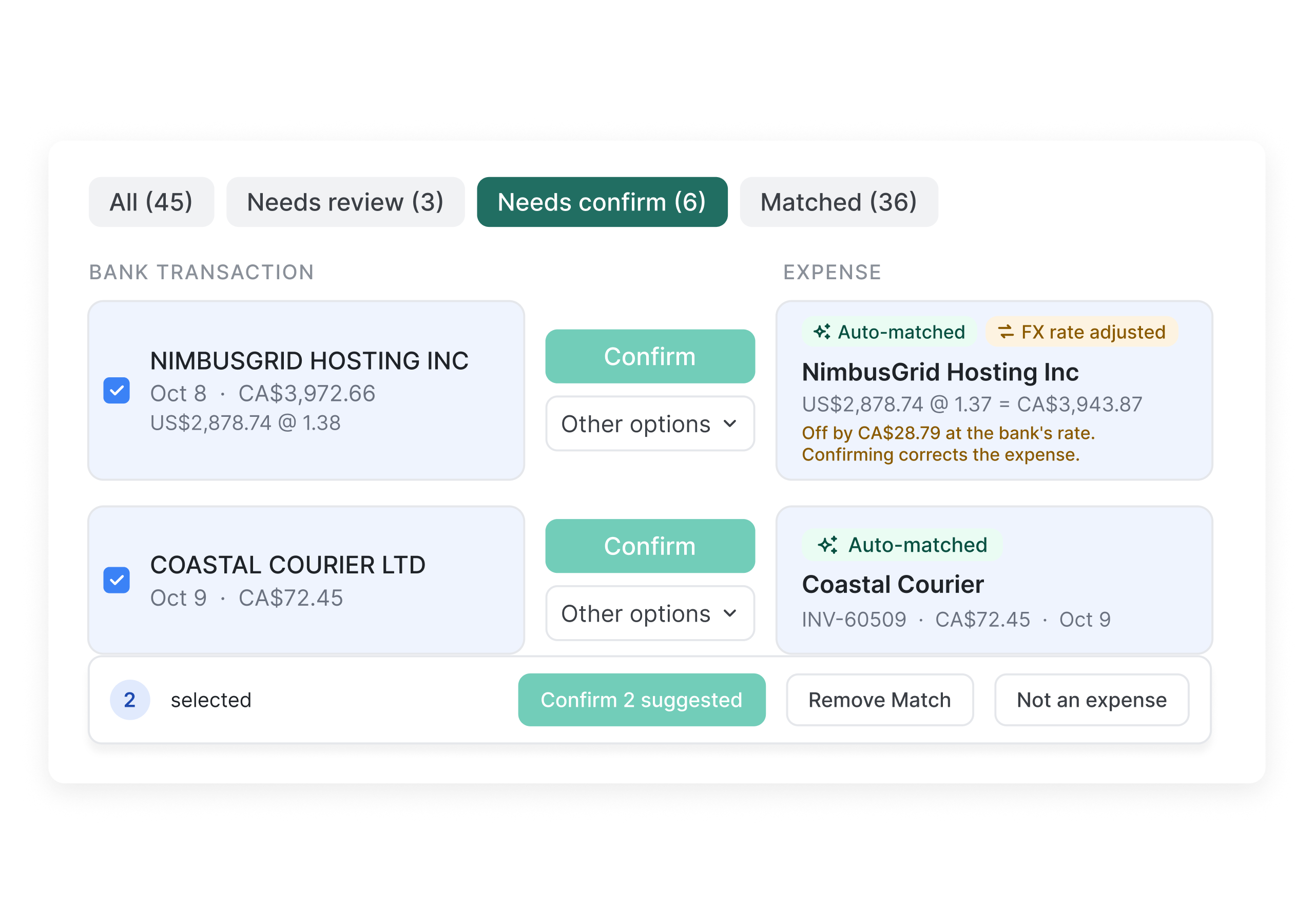
Unlike DocuClipper, Spendifique includes built-in mileage tracking and expense reimbursements. Track business trips, submit out-of-pocket expenses and manage reimbursement approvals in one place.

Spendifique vs DocuClipper: Feature comparison
A side-by-side look at how each platform handles document collection, data extraction, bookkeeping automation, and pricing. DocuClipper details reflect its publicly available features and pricing.
Comparison last reviewed 18 Nov 2026. DocuClipper plans and features may vary by region and change over time. Confirm current details on docuclipper.com
Which one is right for you?
Different bookkeeping needs call for different tools. Here's where each platform has the advantage.
DocuClipper is a better fit if...
You process checks and tax forms
DocuClipper extracts data from checks and tax forms like W-2s and 1099s, as well as statements, invoices and receipts.
You need fraud detection on bank statements
Its Business plan adds fraud detection and flow of funds analysis, useful for lending, forensic or audit work.
You need broader accounting integrations
DocuClipper connects to QuickBooks Desktop, Sage and NetSuite and offers API access.
Spendifique is a better fit if...
You want predictable pricing
Process unlimited documents on paid plans without worrying about page limits.
You want invoices automatically collected from your inbox
Connect your Gmail or Outlook, personal or work, and Inbox Sync finds your invoices and receipts automatically, going back up to 2 years.
You need expense management for your team or clients
Track mileage, manage reimbursements and approve invoices in the same place you match them.
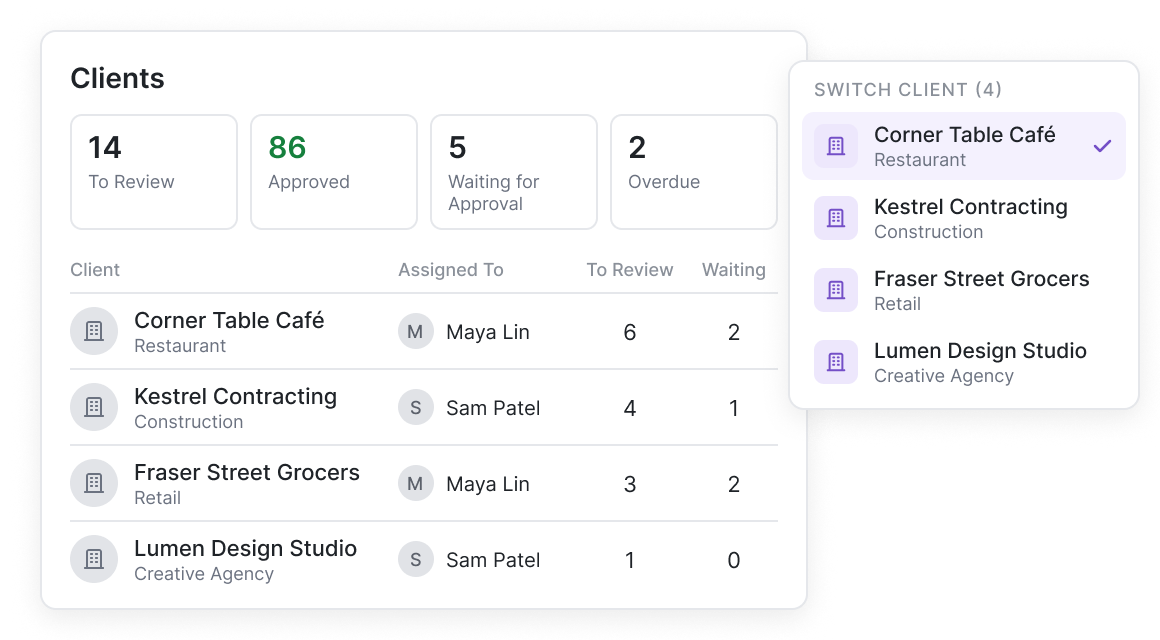
You manage books for multiple clients
The firm dashboard shows every client in one view, with how many items are waiting for review, approval or overdue, so you know where to start each day.
What our customers are saying
Real feedback from bookkeepers and small businesses using Spendifique every day.
Spendifique's QuickBooks Global connection, XCD support, and VAT handling did what we needed. I appreciated how quickly the team responded.

What made me switch was the lack of minimum client requirements. I didn’t want to pay for 10 clients when I only had 4 active ones. The multi-invoice PDF detection has also been surprisingly useful: it asks for confirmation and then automatically splits documents, which saves me a lot of manual effort. The extraction accuracy is better than what I’ve used in Xero and Hubdoc. Turnaround time is fast, and the suggestions are usually correct.
Having no limits on scans or line items is a big win. I don’t have to worry about usage caps when clients upload a large batch of invoices. The multi-line extraction works well, even on more detailed invoices with lots of items. I also appreciate that vendor recognition improves over time, it genuinely feels like the system learns and becomes more accurate the more I use it.
The pricing model is what made me switch. I only pay for the clients I actually have, so there’s no pressure to hit a minimum. The PDF splitting feature is also really useful: it detects when a file contains multiple invoices, prompts me for a quick check, and then separates them automatically. Extraction is fast and usually accurate, even compared with what I used in Xero and Hubdoc.
Spendifique has made receipt and invoice collection much easier for us. It is simple, fast, and feels more modern than a lot of older tools. There is still room to grow, but it already saves us time and reduces manual admin. The AI behind invoice and receipt recognition is also state of the art - we have not seen it make mistakes even for some of our complex documents.

I found Spendifique genuinely helpful and trusted the results. The bank statement reconciliation made it much easier to complete my expenses without manually checking every transaction.

A great app to scan receipts and integrate with QuickBooks. It helps speed up the bookkeeping process and save time.

Speed is what really stands out. I can upload an invoice and within seconds, it's categorized with the vendor and tax details already filled in. The centralized dashboard makes managing multiple clients much easier, especially when assigning work to team members.

The workflow is straightforward and doesn't try to do too much. Setting up new clients is fast, and the chart of accounts and vendor lists sync automatically. Clients find the interface easy to use too, which cuts down on back-and-forth.
Frequently asked questions
Spendifique is a DocuClipper alternative for small businesses and bookkeepers looking for unlimited document scanning and more comprehensive bookkeeping automation. Both platforms offer invoice data extraction and bank statement processing, but Spendifique also supports historical email scanning, automatic cross-currency transaction matching, mileage tracking, and expense reimbursements.
For bookkeepers, Spendifique offers a dedicated firm dashboard to manage all clients in one place. Features such as invoice approvals and advanced team management, which require DocuClipper's Business plan starting at $111.30/month, are available at a lower price with Spendifique. See our pricing page for Small Businesses and Bookkeepers for more details.
Yes. Spendifique's Starter plan costs $8/month and includes unlimited document scanning, while DocuClipper's Starter plan starts at $20.30/month with a monthly equivalent allowance of 60 pages.
Spendifique's Business plan costs $22/month and offers unlimited scanning with AI line-item extraction. It also includes advanced bookkeeping automation features, such as invoice approvals and team management, which require DocuClipper's Business plan starting at $111.30/month, with a monthly equivalent allowance of 640 pages.
For bookkeepers, Spendifique offers a dedicated plan starting at $16.50 per client/month, with the per-client price decreasing as you add more clients. All Spendifique paid plans include unlimited scans, making costs predictable regardless of document volume.
All prices are in USD and based on annual billing. See our pricing page for Small Businesses and Bookkeepers for more details.
Both Spendifique and DocuClipper offer AI-powered document extraction, bank statement processing, and bookkeeping automation.
Spendifique offers more affordable pricing with unlimited document scanning on all paid plans and focuses on everyday bookkeeping needs for small businesses and bookkeepers. It combines automated document collection, cross-currency transaction matching, invoice approvals, mileage tracking, expense reimbursements, and a dedicated firm dashboard.
DocuClipper, on the other hand, uses page-based pricing and offers more specialized tools for lenders, forensic accountants, and tax professionals, including advanced bank statement analysis and fraud detection.
No. DocuClipper uses a page-based pricing model, meaning every page of an invoice or receipt counts toward your subscription allowance. If you exceed your allowance, additional pages are charged per page by default.
Spendifique, on the other hand, offers unlimited receipt, invoice, and bank statement scanning on all paid plans starting at $8/month, billed annually, with no page limits.
DocuClipper does not currently offer dedicated mileage tracking or expense reimbursement tools. Spendifique allows you to log business trips, calculate mileage reimbursements, submit expenses for approval, and manage reimbursements alongside your regular bookkeeping. Both mileage and reimbursement expenses can be managed from the web platform or the Spendifique mobile app.
DocuClipper supports invoice-to-bank transaction matching, but differences in amounts caused by currency conversion may require manual matching. Spendifique automatically matches receipts and invoices to bank and credit card transactions across currencies and adjusts the converted expense amount to reflect the actual amount charged to your account, simplifying foreign currency reconciliation.
Yes. Spendifique's Inbox Sync connects with Gmail and Outlook to automatically collect invoices and receipts. On eligible plans, it can search up to two years of email history and check for new documents daily, reducing the need to forward emails manually.
More questions?
Don’t hesitate to contact us for more info or additional questions you interested in
Ready to do more with your receipts?
Collect invoices and receipts, extract details with AI, and manage more of your bookkeeping in one place. Start with 30 free scans.
Get started freeNo credit card required