A Hubdoc alternative that doesn't stop at capture
Spendifique goes beyond receipt and invoice capture with line-item extraction, AI-powered categorization, statement matching, and missing-document workflows. Spend less time moving between documents and your accounting software, and more time getting the books done.
What Spendifique adds beyond Hubdoc
Hubdoc captures the document. Spendifique keeps going: line items, categories, missing receipts, reporting, and foreign currency.
Line-item extraction
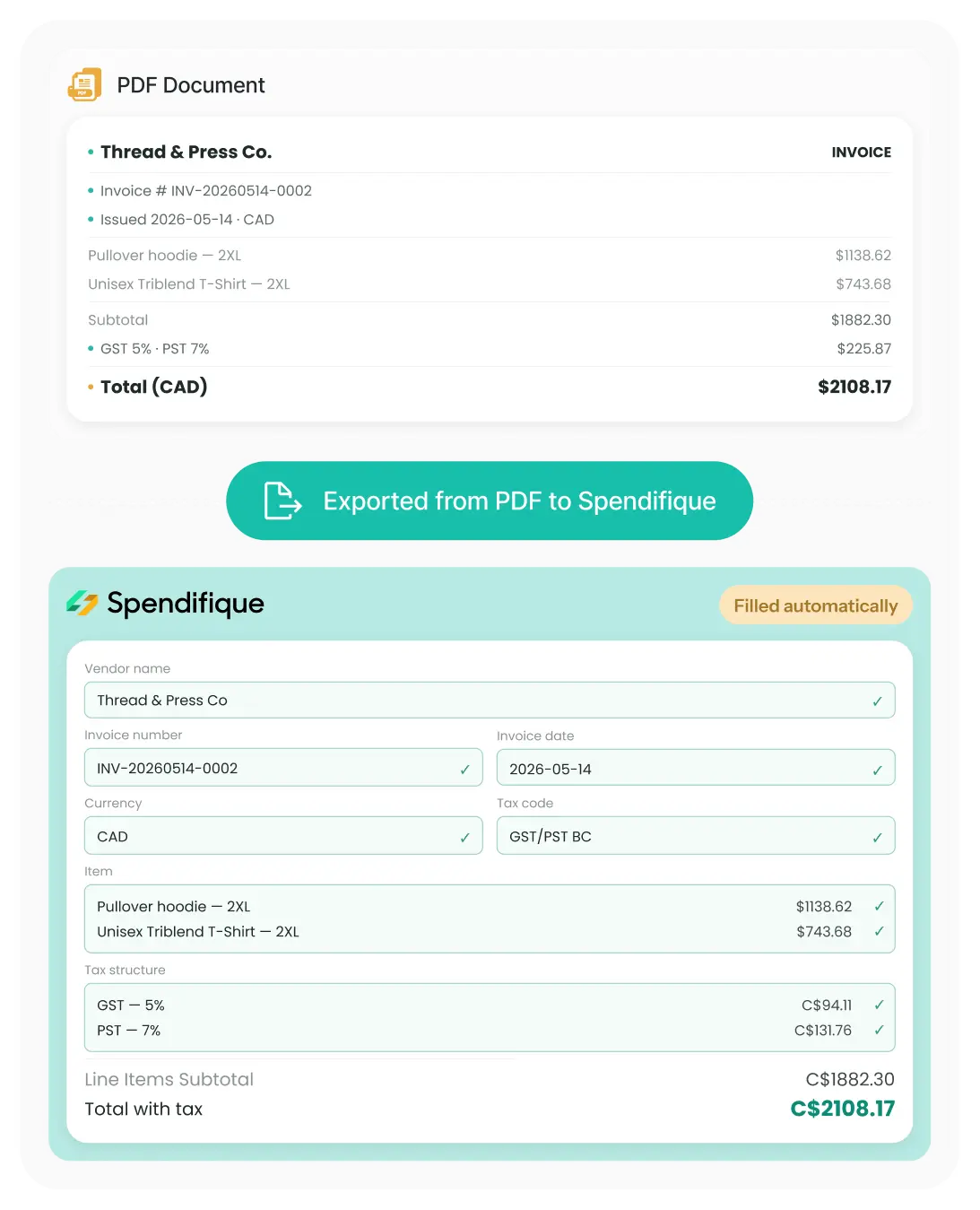
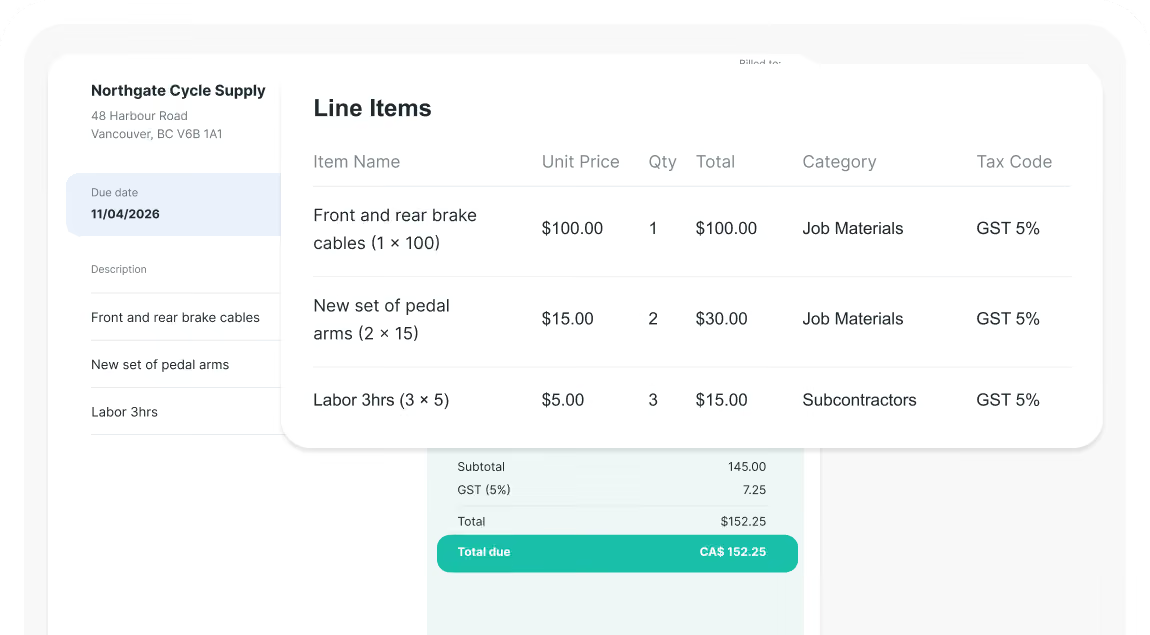
Extract detailed invoice line items, including descriptions, quantities, unit prices, and line totals, , not just invoice header fields.
AI-powered categorization
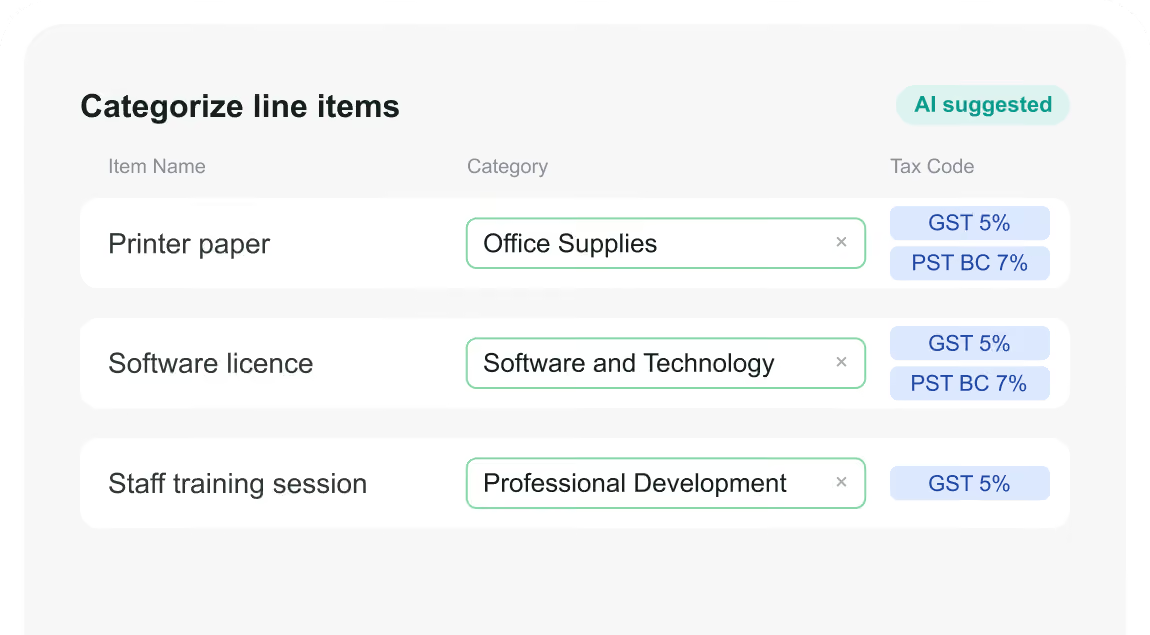
Categorize each line item with AI-powered expense category and tax-code suggestions based on document data, accounting context, and related account information.
Missing document tracking
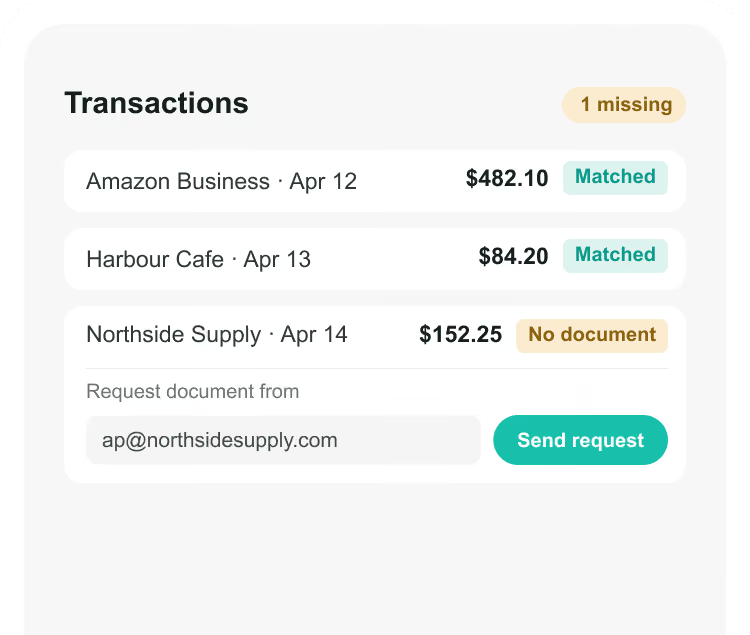
Spot transactions missing a receipt and request it on the spot, even from people outside Spendifique.
Reporting & analytics
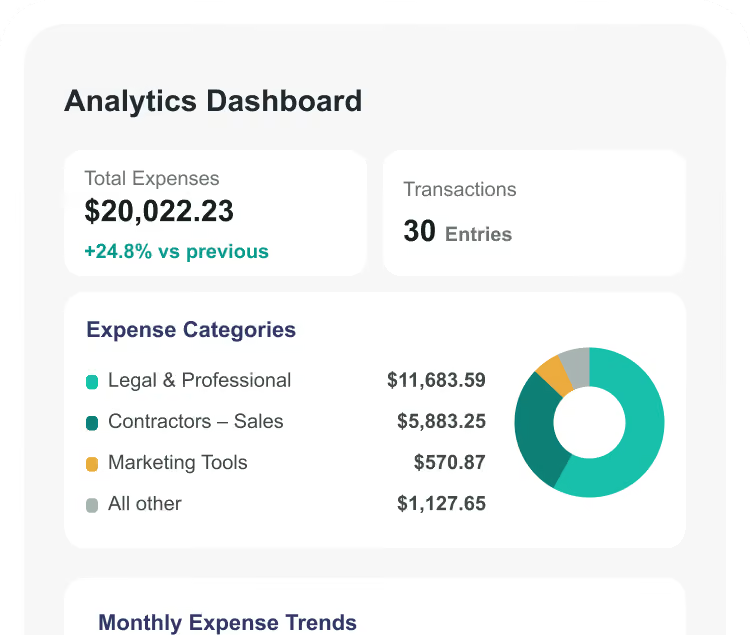
Turn expense data into reports, monthly spending trends, and category comparisons, with PDF and CSV export.
Foreign currency
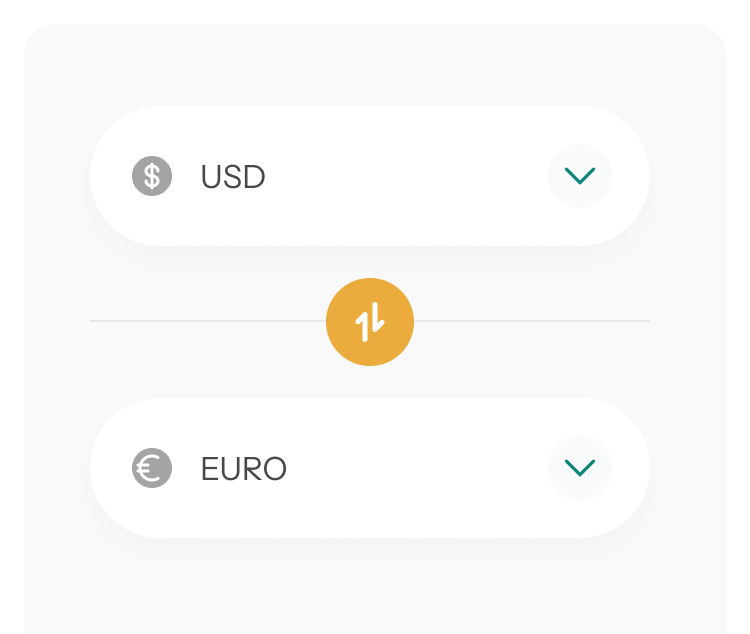
Convert foreign-currency transactions and calculate exchange-rate differences directly in Spendifique.
Spendifique Vs Hubdoc: Features & Pricing
A side-by-side look at how each tool collects documents, reads them, and what it costs. Hubdoc details reflect its published features and pricing.
Comparison last reviewed 31 Aug 2026. Hubdoc plan structures and add-ons may vary by region and change over time. Confirm current details on hubdoc.com.
From receipt to done — In four steps
No manual entry. No spreadsheets. Just snap, forward, or drop in your receipts and let Spendifique handle the rest.
Built for Bookkeepers and Businesses
Bookkeepers & Firms

From $16.50 / client / mo, billed annually. No minimum.
Collect from every client's inbox, chase missing info without logins, and manage it all from one dashboard with single-login client switching. Your cost tracks your client list exactly. Refer other bookkeepers and earn a share of net revenue for 12 months.
Small Businesses & Founders

From $9 / mo.
Connect your own inbox and let receipts collect themselves. Start at $9/mo for solo operators with unlimited scans, or $25/mo for your whole team with unlimited users. Send clean data to your accountant or straight into QuickBooks and Xero
When Hubdoc is the better choice
No tool is right for everyone, and Hubdoc is a strong product.
It is likely the better fit if:
- Your clients are all on Xero and already get Hubdoc included at no extra cost.
- You want the tightest possible Xero connection, from a tool Xero owns and builds.
- You need bills pushed to BILL for payment or documents backed up to Box.
- Your clients' bills rarely need splitting across accounts.
If any of those describe you, Hubdoc earns its place. If instead your real problem is chasing clients for documents and typing in line items by hand, that is exactly what Spendifique is built for.
Moving from Hubdoc takes minutes, not weeks

Connect
Link QuickBooks Online or Xero. Your chart of accounts, vendors, tax codes, and classes import automatically.

Add a client's inbox
Connect a client's inbox, and Spendifique backfills up to 24 months, then keeps collecting daily.

Run a month in parallel
Close one client in Spendifique alongside Hubdoc to see the difference before you commit.
Build trust with transparent billing that clients appreciate
Spendifique is trusted by founders and bookkepers who rely on accuracy every day. Their feedback reflects how Spendifique performs in real workflows, not marketing promises
What made me switch was the lack of minimum client requirements. I didn’t want to pay for 10 clients when I only had 4 active ones. The multi-invoice PDF detection has also been surprisingly useful: it asks for confirmation and then automatically splits documents, which saves me a lot of manual effort. The extraction accuracy is better than what I’ve used in Xero and Hubdoc. Turnaround time is fast, and the suggestions are usually correct.

Having no limits on scans or line items is a big win. I don’t have to worry about usage caps when clients upload a large batch of invoices. The multi-line extraction works well, even on more detailed invoices with lots of items. I also appreciate that vendor recognition improves over time, it genuinely feels like the system learns and becomes more accurate the more I use it.
The pricing model is what made me switch. I only pay for the clients I actually have, so there’s no pressure to hit a minimum. The PDF splitting feature is also really useful: it detects when a file contains multiple invoices, prompts me for a quick check, and then separates them automatically. Extraction is fast and usually accurate, even compared with what I used in Xero and Hubdoc.

Spendifique has made receipt and invoice collection much easier for us. It is simple, fast, and feels more modern than a lot of older tools. There is still room to grow, but it already saves us time and reduces manual admin. The AI behind invoice and receipt recognition is also state of the art - we have not seen it make mistakes even for some of our complex documents.

I found Spendifique genuinely helpful and trusted the results. The bank statement reconciliation made it much easier to complete my expenses without manually checking every transaction.

The comprehensive features of Spendifique cater to all our accounting needs. From invoicing to expense tracking, it covers everything. It's a reliable partner for any business looking to enhance its financial management.

Spendifique has streamlined our accounting processes significantly. The automation features save us time and reduce errors, allowing us to focus on growth and strategy. Highly recommended for startups.

A great app to scan receipts and integrate with QuickBooks. It helps speed up the bookkeeping process and save time.

Speed is what really stands out. I can upload an invoice and within seconds, it's categorized with the vendor and tax details already filled in. The centralized dashboard makes managing multiple clients much easier, especially when assigning work to team members.

The workflow is straightforward and doesn't try to do too much. Setting up new clients is fast, and the chart of accounts and vendor lists sync automatically. Clients find the interface easy to use too, which cuts down on back-and-forth.
What made me switch was the lack of minimum client requirements. I didn’t want to pay for 10 clients when I only had 4 active ones. The multi-invoice PDF detection has also been surprisingly useful: it asks for confirmation and then automatically splits documents, which saves me a lot of manual effort. The extraction accuracy is better than what I’ve used in Xero and Hubdoc. Turnaround time is fast, and the suggestions are usually correct.
Having no limits on scans or line items is a big win. I don’t have to worry about usage caps when clients upload a large batch of invoices. The multi-line extraction works well, even on more detailed invoices with lots of items. I also appreciate that vendor recognition improves over time, it genuinely feels like the system learns and becomes more accurate the more I use it.
The pricing model is what made me switch. I only pay for the clients I actually have, so there’s no pressure to hit a minimum. The PDF splitting feature is also really useful: it detects when a file contains multiple invoices, prompts me for a quick check, and then separates them automatically. Extraction is fast and usually accurate, even compared with what I used in Xero and Hubdoc.
Spendifique has made receipt and invoice collection much easier for us. It is simple, fast, and feels more modern than a lot of older tools. There is still room to grow, but it already saves us time and reduces manual admin. The AI behind invoice and receipt recognition is also state of the art - we have not seen it make mistakes even for some of our complex documents.
I found Spendifique genuinely helpful and trusted the results. The bank statement reconciliation made it much easier to complete my expenses without manually checking every transaction.
The comprehensive features of Spendifique cater to all our accounting needs. From invoicing to expense tracking, it covers everything. It's a reliable partner for any business looking to enhance its financial management.
Spendifique has streamlined our accounting processes significantly. The automation features save us time and reduce errors, allowing us to focus on growth and strategy. Highly recommended for startups.
A great app to scan receipts and integrate with QuickBooks. It helps speed up the bookkeeping process and save time.
Speed is what really stands out. I can upload an invoice and within seconds, it's categorized with the vendor and tax details already filled in. The centralized dashboard makes managing multiple clients much easier, especially when assigning work to team members.
The workflow is straightforward and doesn't try to do too much. Setting up new clients is fast, and the chart of accounts and vendor lists sync automatically. Clients find the interface easy to use too, which cuts down on back-and-forth.
Simple pricing. No surprises.
Start free with 30 scans. Upgrade when you're ready. Paid plans includes unlimited scans, unlimited users, and full access to every feature.
Free
Try Spendifique with no commitment. 30 free scans included. Then $0.50 per scan. No subscriptions required.
- AI-powered extraction and categorization
- Approval workflow
- QuickBooks and Xero sync
- Email forwarding
- Duplicate invoice detection
- Unlimited manual expense entry
- Multi-currency support
- Data export (CSV/PDF)

Start with 30 free scans to see how Spendifique fits your workflow. Pay only $0.50 per scan after that — no subscription required.
Bookkeeper
Per client license for bookkeepers and accounting firms
- Everything in Free
- Unlimited scans per client
- Unlimited users
- Firm dashboard for managing all clients
- Priority email support
- Early access to beta features

Add clients as you grow. $19 per client per month — no minimums, no per-user fees, no hidden charges. Every feature included.
Custom
For firms with 30+ clients, volume discounts, onboarding support, and custom billing options.
- Everything in the Bookkeeper plan
- Volume discounts for 30+ clients
- Dedicated onboarding support
- Custom billing arrangements
- Priority support
Managing 30 or more clients? Let's build a pricing plan that works for your firm. No commitment required to start the conversation.
Questions? We've got answers.
Connect a single inbox, usually the business owner's, and Spendifique imports up to 24 months of past invoices and receipts on the first run, then checks the inbox every day and pulls in anything new automatically. Clients can also forward invoices to a custom address or snap photos in the mobile app, and you can drag and drop batches into the web portal. Most of the collection happens without the client doing anything.
Yes. On any statement line or expense, select one transaction or a batch, choose exactly what you need (category, class, customer, a note, or an answer to a question), and send. The client gets a simple survey-style link, answers with no login, and can attach the missing document right there.
Yes, for bookkeepers and small businesses who spend time chasing documents or typing in line items. Spendifique collects invoices from your client's inbox, requests missing details without a client login, and extracts every line on the invoice. It syncs with QuickBooks Online, Xero, and Google Sheets, and starts free with 30 scans. If your clients are all on Xero and their bills rarely need splitting, Hubdoc may be all you need.
No. Hubdoc captures the header details of a bill: supplier, amount, invoice number, and due date. Spendifique extracts every line, with its description, quantity, unit price, and total.
Yes. Spendifique starts free with 30 scans and no time limit, so you can run one client through it for a month alongside Hubdoc before deciding.
More questions?
Don’t hesitate to contact us for more info or additional questions you interested in

Let The Documents Come To You
Connect one inbox and watch the receipts collect themselves.
Start with 30 free scans, no credit card needed, and run a real client through Spendifique.