Every small business receives bills from suppliers. But getting those bills into your accounting records isn't always straightforward.
A supplier might email a PDF invoice, an overseas manufacturer might send a document with dozens of products, and a software provider might include the entire receipt directly in an email. Someone still needs to collect everything, check the details, record the expenses, pay suppliers, and make sure the transactions match what's on the bank statement.
For small business owners, these tasks can take up hours that could be spent running the business.
An organized invoice processing workflow helps you keep track of supplier bills, avoid missing documents, and maintain accurate financial records. With AI-powered automation, much of the repetitive work can be handled automatically.
In this guide, we'll walk through the six steps of invoice processing, using an e-commerce business as an example, and explain how automation can simplify each stage.
What Is an Invoice Processing Workflow?
An invoice processing workflow is the series of steps a business follows to collect, verify, approve, record, pay, and match supplier invoices against financial transactions.
In this article, we're talking about supplier invoices, also called vendor bills or simply bills. These are invoices your business receives for purchases, not sales invoices you send to customers.
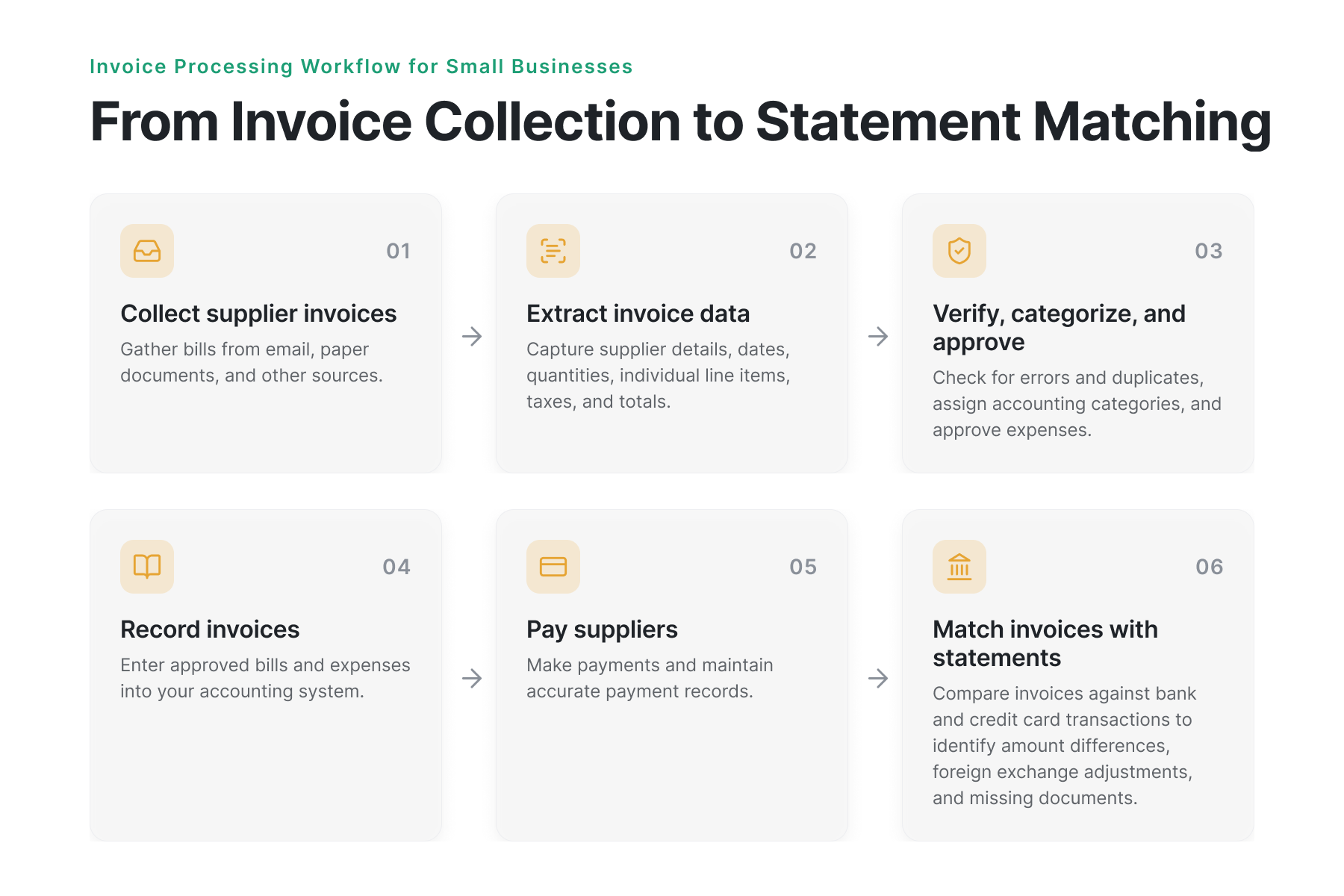
A typical invoice processing workflow includes six steps:
- Collect supplier invoices: Gather bills from email, paper documents, and other sources.
- Extract invoice information: Capture supplier details, dates, quantities, individual line items, taxes, and totals.
- Verify, categorize, and approve: Check for errors and duplicates, assign accounting categories, and approve expenses.
- Record invoices: Enter approved bills and expenses into your accounting system.
- Pay suppliers: Make payments and maintain accurate payment records.
- Match invoices with statements: Compare invoices against bank and credit card transactions to identify amount differences, foreign exchange adjustments, and missing documents.
The order can vary depending on how your business operates. For example, a credit card purchase may be charged before you receive the invoice.
The goal is to make sure every supplier purchase is documented, recorded accurately, and accounted for.
The 6 Steps of Invoice Processing
1. Collect Supplier Invoices
The first step is gathering invoices and bills from all the places your business receives them.
Consider a small e-commerce business that purchases products from overseas manufacturers and resells them online. It might receive inventory invoices from international suppliers, packaging invoices from local vendors, and monthly bills for shipping software or subscriptions.
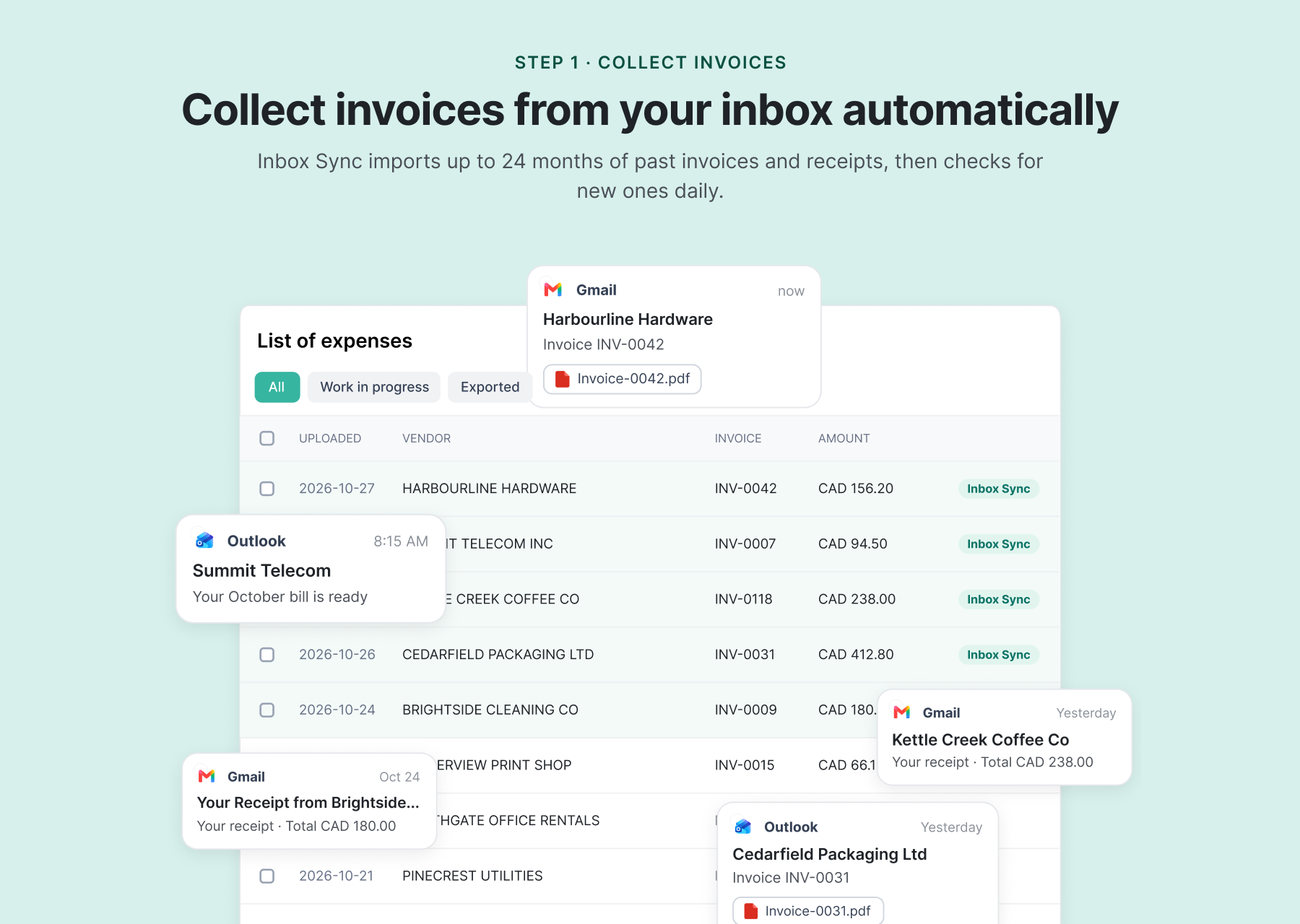
These documents don't always arrive in the same format. Some come as PDF attachments, others are photographed or scanned, and some receipts are written directly in the body of an email. When invoices are scattered across inboxes and folders, it's easy to miss a document or spend time searching for it at month-end.
How automation helps: Invoice collection software can automatically identify and import supplier invoices from connected email accounts, reducing the need to download and upload each document manually.
Spendifique's Inbox Sync connects to Gmail or Outlook and retrieves up to 24 months of historical invoices and receipts. It then collects new documents daily. It can also identify invoices contained directly in the email body, even when there's no attachment, and turn that content into a PDF for processing.
For our e-commerce business, this means supplier bills and recurring subscription receipts can be collected without someone searching through the inbox every week.
2. Extract Invoice Information and Individual Line Items
Once an invoice has been collected, the next step is capturing the information needed for bookkeeping.
This typically includes:
- Supplier name and invoice number
- Invoice date and payment due date
- Product or service descriptions
- Quantities, unit prices, and line totals
- Subtotal, taxes, and total amount
For a business purchasing inventory, the individual products on an invoice can be just as important as the overall total.
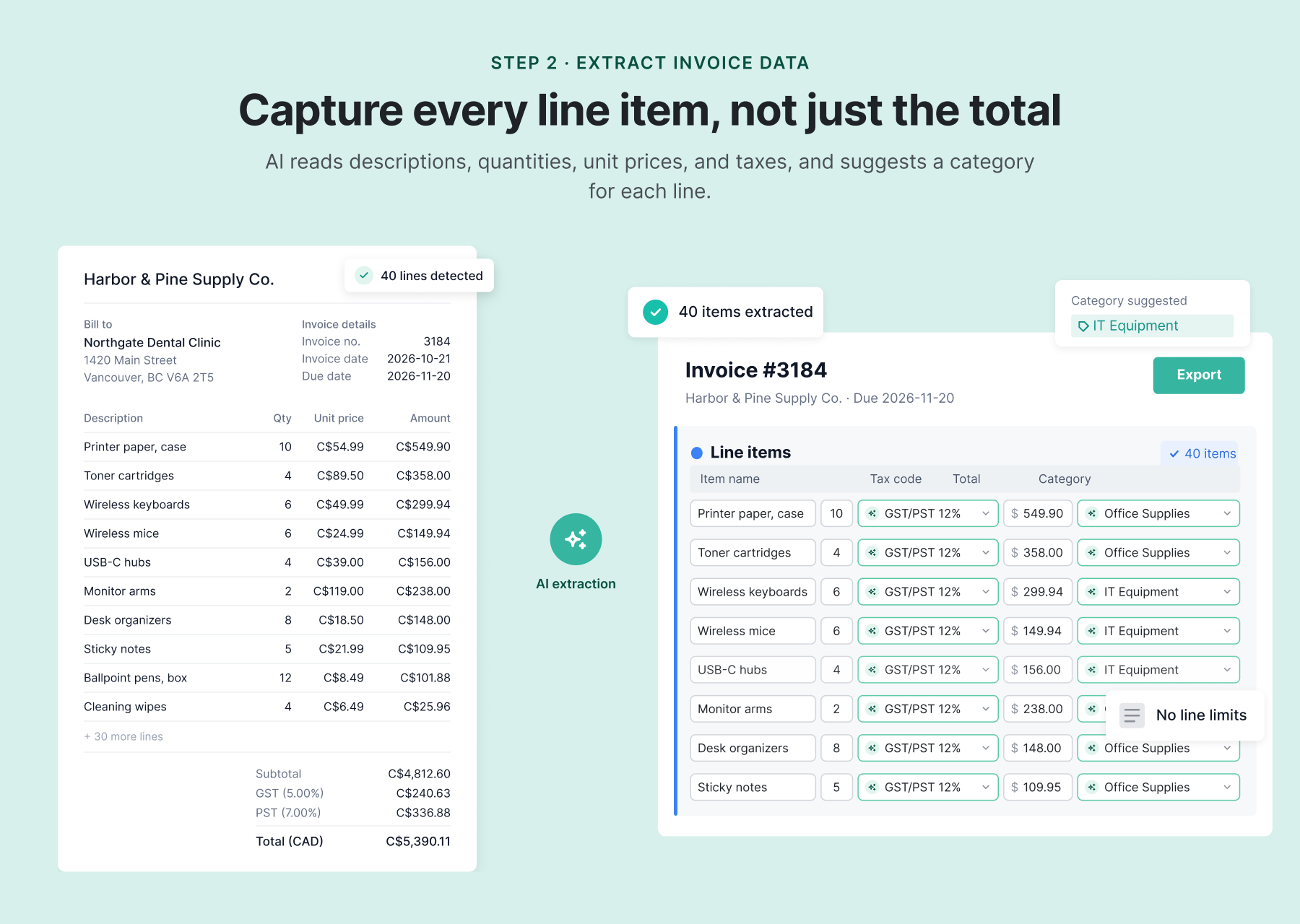
Imagine our e-commerce business receives a supplier invoice containing 40 different products. Entering every product description, quantity, and price manually takes time, especially when similar invoices arrive throughout the month.
Basic invoice scanning tools may capture only the supplier, date, and total, leaving individual products to be entered separately.
How automation helps: AI invoice data extraction reads invoices and fills in the relevant fields automatically, reducing manual entry.
Spendifique's AI line item extraction captures individual products and services, including descriptions, quantities, unit prices, line totals, and taxes.
Instead of typing out all 40 products, the business owner can review the extracted information and make any necessary edits. This is especially useful for businesses handling detailed supplier invoices, mixed purchases, or large product orders.
3. Verify, Categorize, and Approve Invoices
Before recording a supplier bill, it's important to check that the information is accurate.
This can involve confirming supplier details, reviewing amounts and taxes, identifying duplicate invoices, and checking for missing information. For businesses that use purchase orders, the invoice may also need to be compared with the original order or delivery records.
Expenses also need to be assigned to the appropriate accounting categories.
For example, our e-commerce business might purchase inventory for resale, packaging supplies, and office equipment. Although these purchases are all business expenses, they may need to be recorded differently.
Inventory purchases generally need to be tracked separately from operating expenses, according to the business's accounting method.
Some invoices also require approval before they can move forward. In a small business, the owner might approve larger purchases, while employees handle routine expenses.
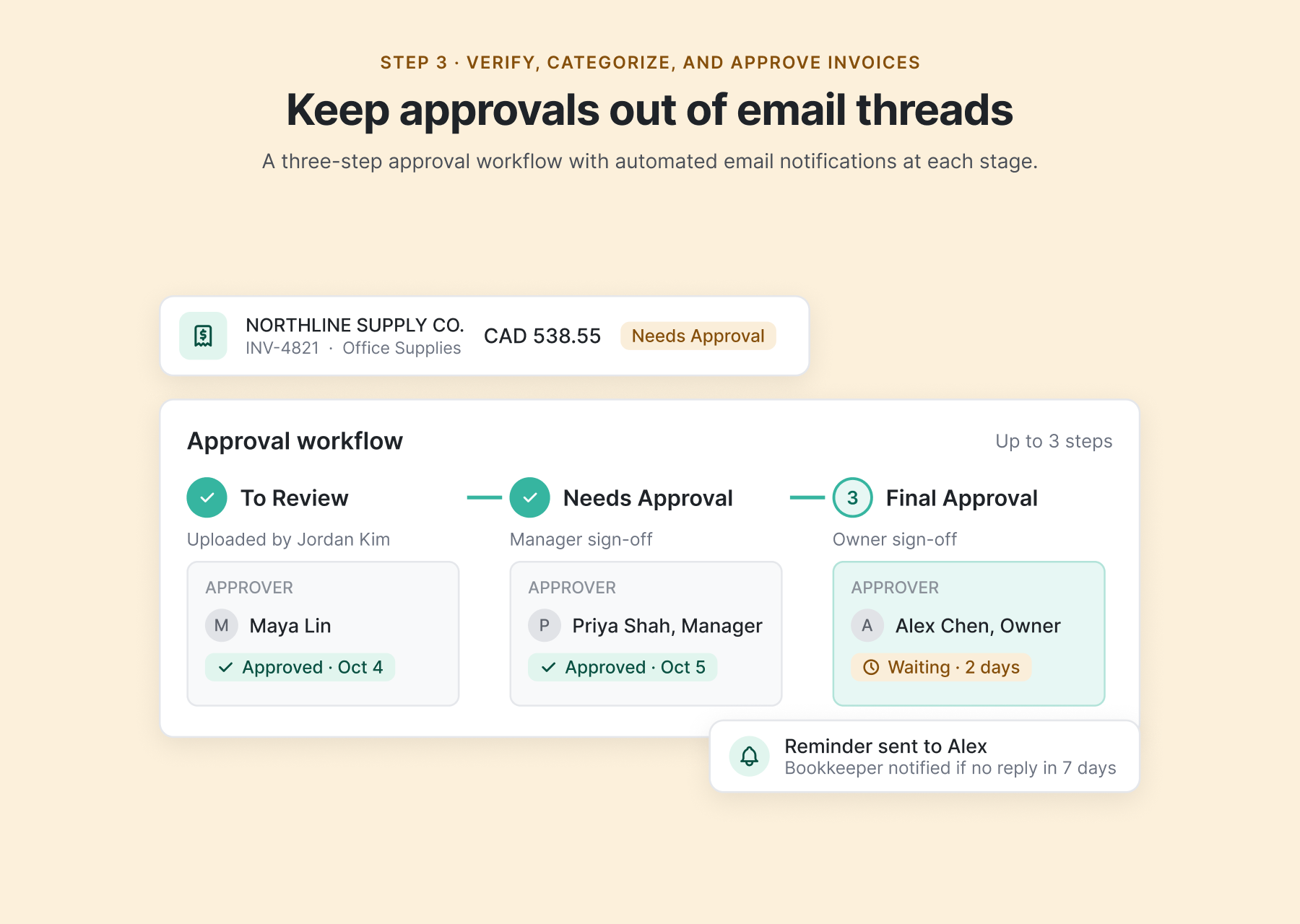
How automation helps: AI-powered invoice processing can identify potential duplicates, suggest accounting categories, and organize approvals without relying entirely on manual data entry or email conversations.
Spendifique automatically extracts invoice information and flags potential duplicates. Users can review and edit the extracted fields before recording expenses.
Its AI also suggests accounting categories and tax codes for individual line items, based on the chart of accounts and previous choices. Rules for recurring suppliers help keep categorization consistent.
Spendifique also supports a three-step invoice approval workflow with automated email notifications, helping businesses track which invoices are awaiting review or approval.
For our e-commerce business, this means a supplier invoice can be checked for duplicate entries, its products assigned to appropriate accounts, and the bill reviewed before being recorded.
4. Record Invoices in Your Accounting System
Once a supplier invoice has been verified and approved, its details need to be recorded in your accounting system.
Many small businesses use accounting software such as QuickBooks Online or Xero to track supplier bills, expenses, and outstanding balances. Recording an invoice creates an accounting record of the purchase. It doesn't necessarily mean the supplier has already been paid.
For example, our e-commerce business might receive a supplier invoice with payment terms of 30 days. The bill can be recorded when received, while payment is made later according to those terms.
When invoice details are entered manually, the same information may need to be copied from a PDF or spreadsheet into the accounting system.
How automation helps: Invoice processing software can transfer extracted and categorized information directly to accounting software, reducing duplicate data entry.
Spendifique integrates with QuickBooks Online and Xero, allowing businesses to sync processed invoice data instead of entering it again. Supporting documents can also be attached to the accounting records.
For businesses that don't use dedicated accounting software, Spendifique supports Google Sheets, making it possible to organize and manage invoice information in spreadsheets.
Our e-commerce business can review its supplier invoices in Spendifique, then send the approved data to its accounting system with the supporting documents attached.
5. Pay Suppliers and Maintain Payment Records
After a supplier bill has been recorded, the business needs to pay it according to the agreed terms.
Depending on the supplier, payments may be made by bank transfer, credit card, or another payment method.
For businesses purchasing goods internationally, payments can involve different currencies, exchange rates, and additional transaction fees.
Our e-commerce business, for example, might pay a Canadian packaging supplier in CAD and an overseas manufacturer in USD.
Keeping accurate payment records is important for tracking outstanding bills, avoiding late payments, and confirming which invoices have already been paid.
How automation helps: Some accounts payable platforms support payment scheduling, reminders, and payment execution. Accounting software can also help businesses track due dates and payment status.
Spendifique focuses on preparing accurate invoice and expense information for your accounting workflow. It helps collect, extract, categorize, and organize supplier bills, but does not execute supplier payments.
Businesses can continue using their existing banking and payment methods while keeping their invoice records organized.
6. Match Invoices Against Bank and Credit Card Statements
The invoice processing workflow doesn't end when a supplier is paid.
Businesses also need to compare their invoices and expense records with the actual transactions appearing on bank and credit card statements.
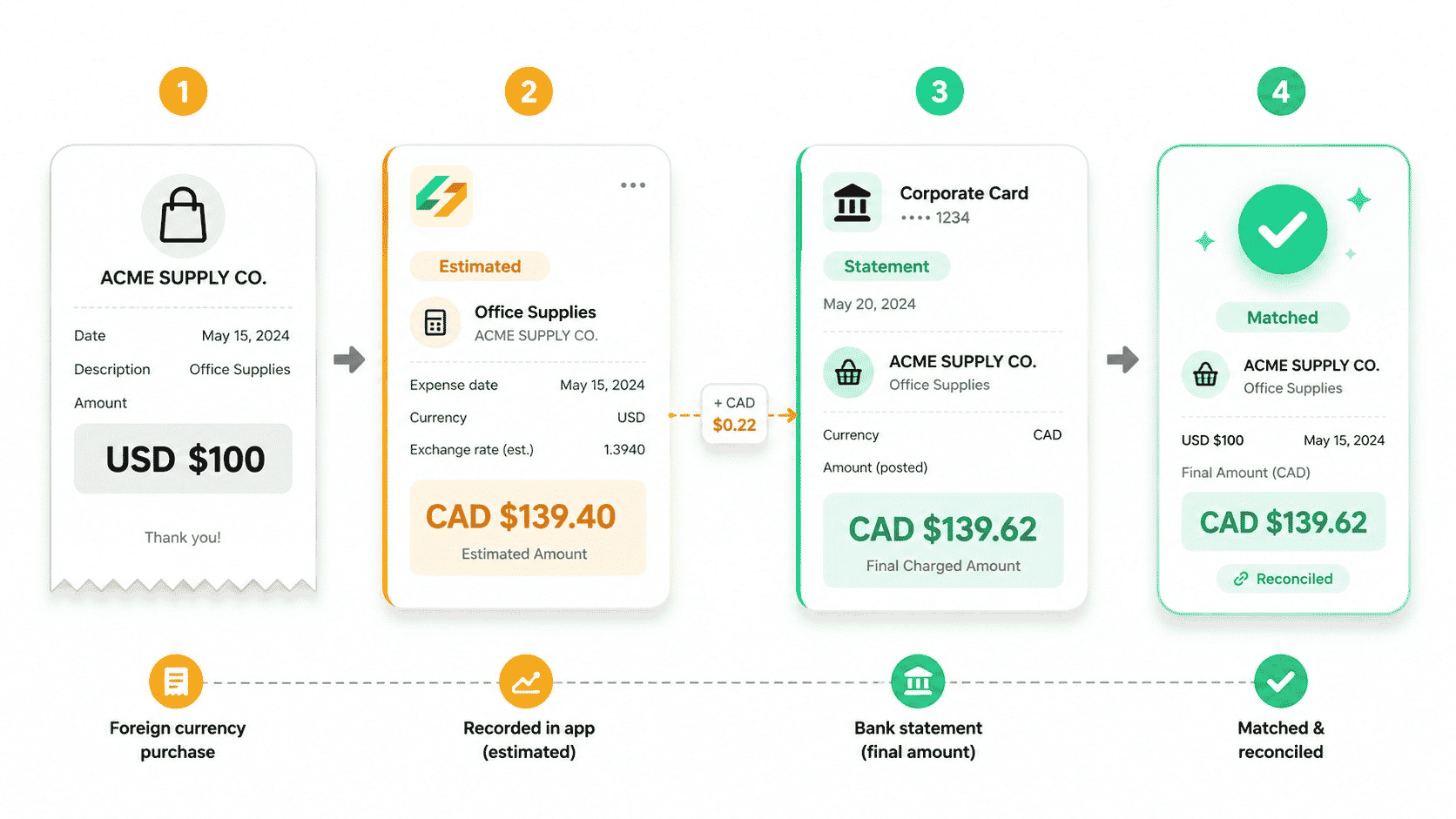
This is particularly important because the amount on a supplier invoice doesn't always match the amount ultimately charged.
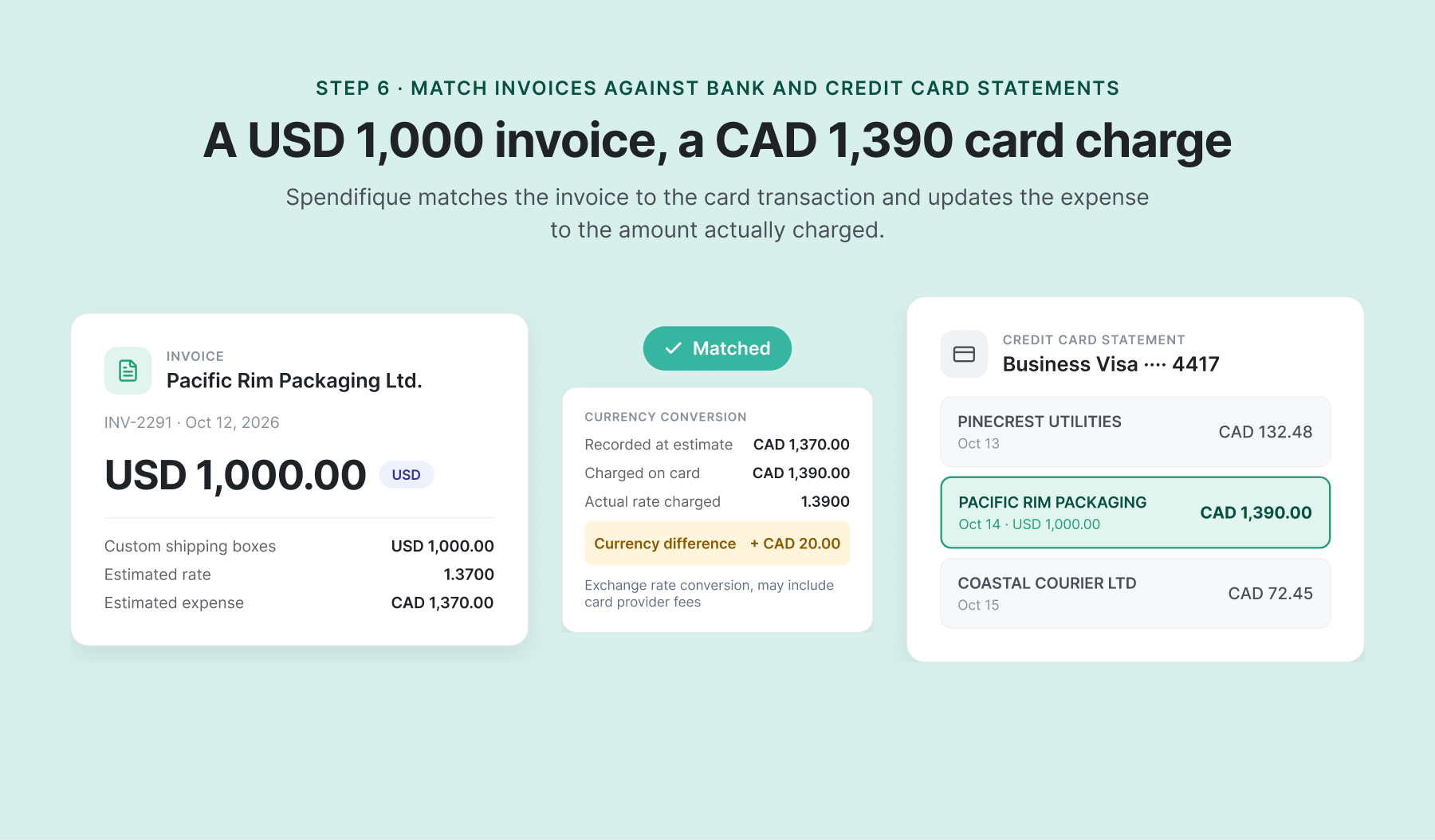
For example, our e-commerce business receives an invoice for USD 1,000 from an overseas supplier. When the payment settles, its Canadian credit card statement shows a charge of CAD 1,390.
The difference reflects the currency conversion applied to the transaction, potentially including card-provider fees. The business needs to account for the actual amount charged rather than relying only on an estimated exchange rate.
Other common issues include:
- Amount differences: A bank or credit card charge differs from the original invoice.
- Foreign exchange adjustments: The actual converted amount differs from the amount initially recorded.
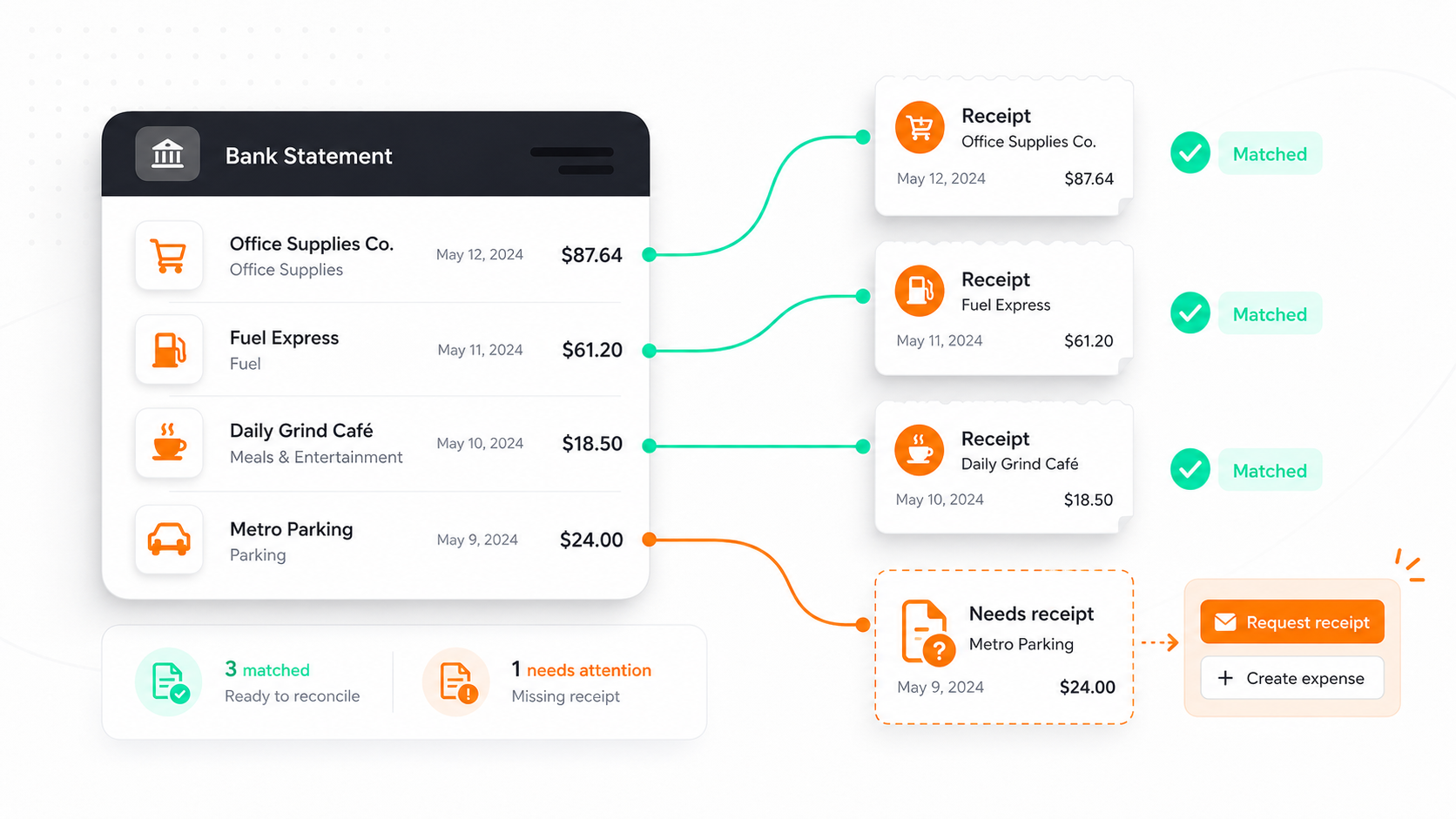
- Missing invoices: A transaction appears on the statement, but the business can't find its supporting invoice or receipt.
Missing documents are especially common when invoices land in spam folders, are sent to individual employees, or were never forwarded to the person managing the books.
How automation helps: Statement matching software compares recorded expenses and supporting documents against bank and credit card transactions, helping identify differences and missing information.
Spendifique's bank statement matching lets businesses upload bank and credit card statements, match transactions to existing invoices and receipts, and review unmatched entries.
When a match is confirmed, Spendifique can update the expense to reflect the actual statement amount, including foreign exchange differences.
For our e-commerce business, this helps account for the CAD 1,390 credit card charge against the USD 1,000 supplier invoice. It can also highlight transactions that don't have supporting documents.
This makes it easier to confirm that the business has the invoices and receipts needed to complete its monthly bookkeeping.
Statement matching supports accurate bookkeeping, but it is not the same as completing the full bank reconciliation process.
Common Challenges in Manual Invoice Processing
Even a relatively small business can struggle with invoice processing when purchases come from multiple suppliers and payment methods.
Missing or Scattered Supplier Invoices
Supplier invoices can end up in different email accounts, folders, or employee inboxes.
Some arrive as attachments, while others contain the invoice details directly in the email body. These messages can be overlooked when someone is searching only for PDF attachments.
Automatically collecting invoices from email, including those without attachments, helps reduce the number of documents that need to be found manually.
Time-Consuming Data Entry
Detailed supplier invoices can contain dozens of individual products, quantities, prices, and taxes.
Entering this information manually takes time and increases the chance of mistakes.
AI-powered extraction helps reduce this work by capturing invoice details and individual line items automatically.
Duplicate Invoices and Incorrect Categories
The same supplier invoice might be downloaded twice, forwarded by multiple employees, or entered more than once.
Businesses also need to distinguish between inventory purchases, packaging, equipment, and other operating expenses.
Duplicate detection and AI-assisted categorization can help identify potential problems before they affect accounting records.
Delayed Invoice Approvals
When invoices need approval, email threads and manual follow-ups can slow down the process.
A structured approval workflow makes it easier to see which bills are waiting for review and who needs to take action.
Missing Documents and Statement Differences
At month-end, a business may discover credit card charges without corresponding receipts or supplier invoices.
International purchases can create additional work when the original invoice amount differs from the converted amount on the statement.
Matching invoices against actual bank and credit card transactions helps identify these issues before the business completes its monthly bookkeeping.
Manual vs. Automated Invoice Processing
Automation reduces repetitive work, but it doesn't eliminate the need for human review. Business owners should still check unusual transactions, confirm important purchases, and maintain appropriate approval controls.
How Spendifique Helps Small Businesses Process Supplier Invoices
Spendifique brings invoice collection, AI data extraction, expense categorization, approvals, and statement matching into one connected workflow.
Instead of moving documents between email, spreadsheets, and accounting software, you can organize supplier bills and review expense information in one place.
With Spendifique, you can:
- Automatically collect invoices: Connect Gmail or Outlook to import up to 24 months of historical invoices and receipts, then collect new documents daily.
- Extract individual line items: Capture supplier details, quantities, prices, taxes, and individual products or services.
- Categorize expenses with AI: Get suggested accounting categories and tax codes for individual purchases.
- Manage invoice approvals: Use a three-step approval workflow with automated email notifications.
- Match invoices with statements: Identify amount differences, foreign exchange adjustments, and transactions missing supporting documents.
- Sync with QuickBooks Online: Transfer reviewed invoice data to your accounting software, or work with Xero or Google Sheets.
Spendifique doesn't replace your accounting software or payment system. It helps organize the documents and expense information those systems rely on.
Frequently Asked Questions
What is invoice processing automation?
Invoice processing automation uses software to reduce manual tasks involved in collecting supplier invoices, extracting data, checking information, categorizing expenses, managing approvals, and preparing accounting records. It helps small businesses process bills more efficiently while keeping important information available for review.
What are the six steps of invoice processing?
The six main steps are collecting supplier invoices, extracting invoice data, verifying and approving bills, recording invoices in accounting software, paying suppliers, and matching invoices against bank and credit card statements. The exact order may vary depending on the business and how purchases are paid.
What is the difference between a supplier invoice and a sales invoice?
A supplier invoice, also called a vendor bill, is a document your business receives when purchasing goods or services. A sales invoice is a document your business sends to a customer requesting payment. This guide focuses on processing supplier invoices and bills.
Can supplier invoices be automatically collected from email?
Yes. Invoice collection software can connect to supported email accounts and retrieve supplier invoices automatically. Spendifique's Inbox Sync imports up to 24 months of historical invoices and receipts and collects new documents daily. It can also process invoice information contained directly in an email, even when no PDF is attached.
Can AI extract individual products from a supplier invoice?
Yes. AI line item extraction can capture individual product descriptions, quantities, unit prices, line totals, and taxes instead of only reading the overall invoice amount. Spendifique's line item extraction supports detailed supplier invoices containing dozens or hundreds of products, allowing users to review and edit the extracted information.
Can AI detect duplicate invoices?
Yes. Some AI invoice processing tools can identify potential duplicates by comparing invoice information. Spendifique includes duplicate invoice detection, helping businesses flag repeated documents before recording the same expense more than once.
Can invoice approvals be automated?
Yes. Invoice approval automation helps businesses organize how supplier bills are reviewed and approved. Spendifique supports a three-step approval workflow with automated email notifications, making it easier to track invoices that require attention.
Can I automate invoice processing without accounting software?
Yes. You can automate invoice collection, data extraction, and expense categorization without using a dedicated accounting platform. Spendifique supports Google Sheets, making it an option for businesses that don't use QuickBooks Online or Xero.
How do I handle supplier invoices in foreign currencies?
Record the invoice in its original currency and keep track of the amount actually paid. Exchange rates and payment-provider fees can cause the final bank or credit card charge to differ from the original invoice amount. Spendifique's statement matching helps identify these differences and update matched expense amounts using the actual statement transaction. For a more detailed explanation, read our guide on recording foreign currency expenses before your bank statement arrives.
Which invoice processing tasks can Spendifique automate?
Spendifique helps automate invoice collection, AI data extraction, expense categorization, duplicate detection, approval workflows, and statement matching. It also syncs processed information with QuickBooks Online, Xero, and Google Sheets. Supplier payments are handled separately through your existing banking or payment tools.
Make Supplier Invoice Processing Easier
Processing supplier invoices shouldn't mean spending hours searching through emails, entering product details, or trying to find missing receipts at month-end.
By automating invoice collection, data extraction, categorization, and statement matching, small businesses can reduce repetitive work and keep their financial records more organized.
Spendifique helps bring these steps together, whether you're managing a handful of monthly bills or detailed supplier invoices with dozens of individual products.