The foreign expense problem every bookkeeper knows
You receive a receipt or invoice in another currency. You need to record the expense now, but you do not yet know the final amount your bank or credit card issuer will charge in your home currency.
That amount may not appear until the statement arrives days or weeks later.
This often leaves bookkeepers with two imperfect options:
- Record the expense now using an estimated exchange rate, then correct it manually later.
- Wait for the statement and leave the expense unrecorded in the meantime.
Neither option is ideal. Waiting slows down the bookkeeping workflow, while correcting every foreign transaction at month-end creates unnecessary work.
Spendifique gives you another option. You can record the foreign expense immediately using an estimated exchange rate, improve the estimate with a configurable surcharge, and continue your normal bookkeeping process.
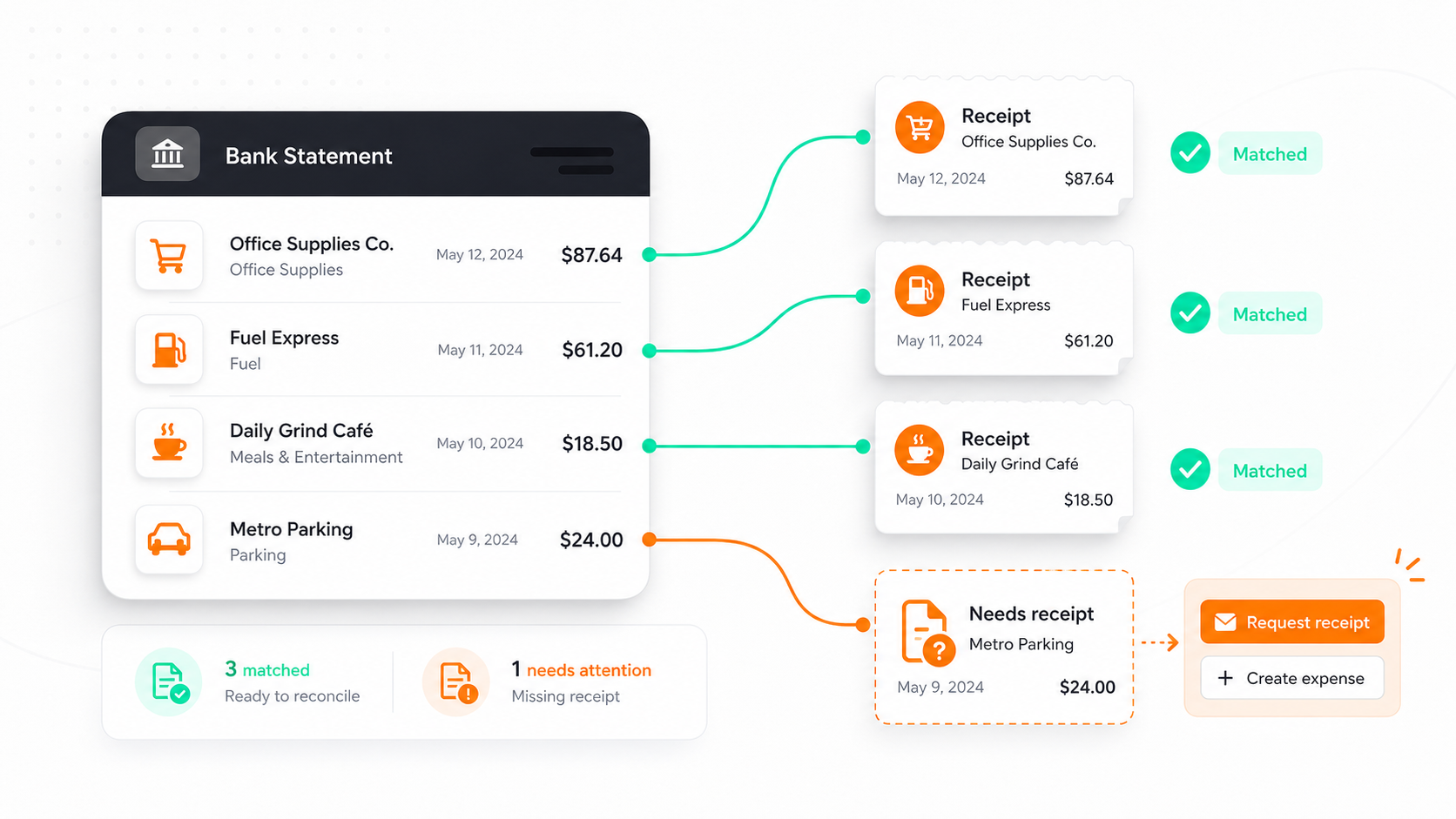
When the bank or credit card statement arrives, Spendifique can suggest a match between the statement transaction and the expense. After you confirm the match, Spendifique adjusts the effective exchange rate and translated amount so they agree with the amount actually charged on the statement.
How do you record a foreign expense before the statement arrives?
To record a foreign currency expense before the statement is available, use an estimated exchange rate when entering the receipt or invoice.
When the statement arrives, match the recorded expense to the statement transaction and update the home-currency amount to what the bank or credit card issuer actually charged.
With Spendifique, the initial estimate, surcharge calculation, transaction matching, and final exchange-rate adjustment can all be handled within the same workflow.
Why the statement amount often differs from the daily exchange rate
The exchange rate shown online is often a reference or mid-market rate. It represents the midpoint between the rates at which currencies are bought and sold.
Your bank or credit card issuer may use a different rate when processing the transaction. The final amount can be affected by:
- The card network’s conversion rate
- The date the transaction is processed or settled
- An exchange-rate margin applied by the issuer
- A separate foreign transaction fee
- Changes in the exchange rate between the purchase and settlement dates
That is why a foreign expense recorded using a daily exchange rate may not match the amount that eventually appears on the statement.
The difference might be small for one purchase. Across many foreign transactions, however, manually correcting each entry can become a repetitive part of the month-end close.
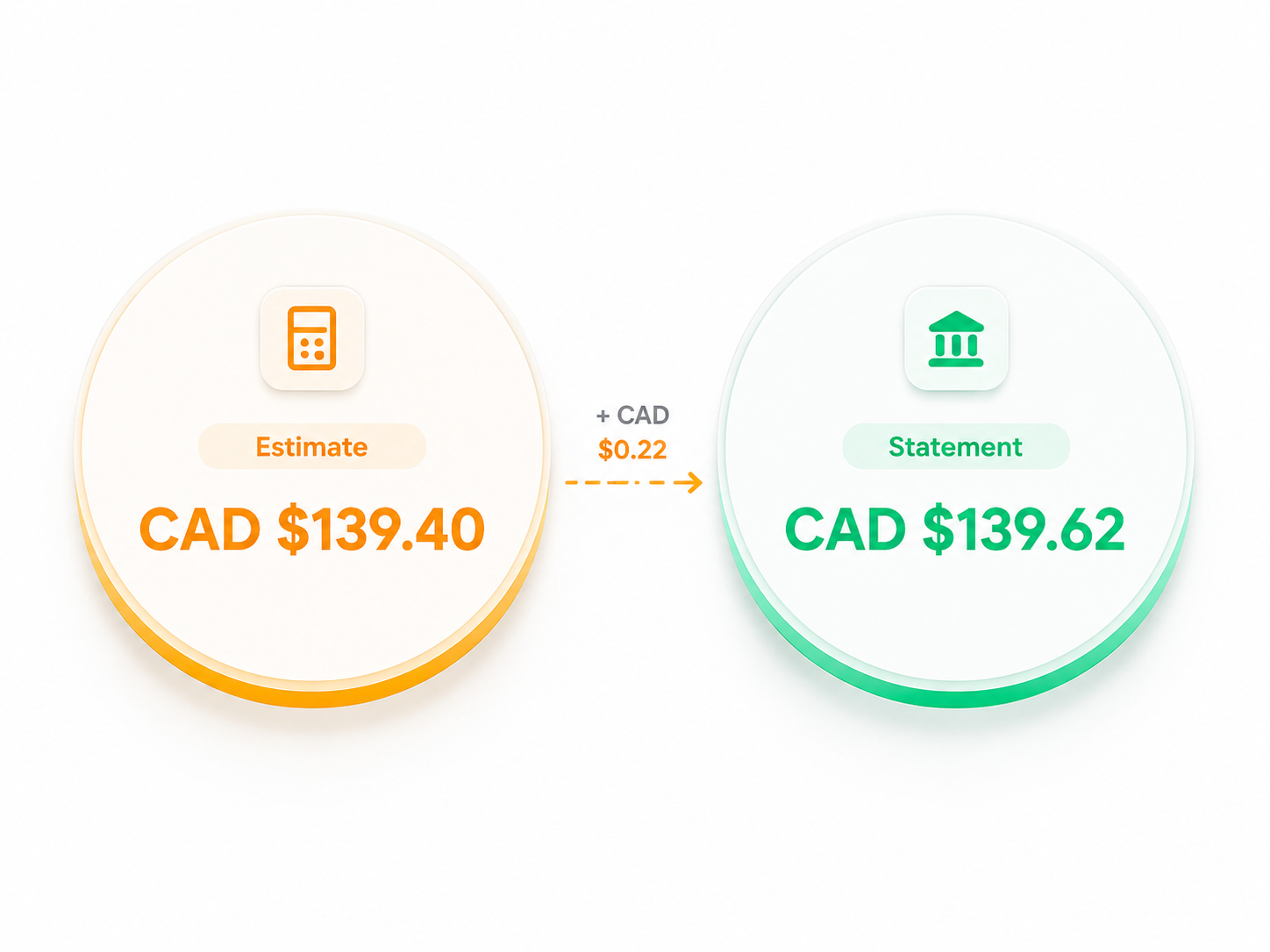
The Spendifique workflow is designed around this reality: estimate the converted amount when the expense is recorded, then adjust it to the statement amount later.
Step 1: Record the foreign expense as usual
Upload the receipt or invoice to Spendifique using the same process you use for your other expenses.
You can:
- Scan it using the mobile app
- Drag and drop it into Spendifique
- Upload a PDF or image
- Submit it through one of your document collection workflows
Spendifique extracts the transaction details and identifies the currency used on the source document.
It then records the expense using the exchange rate calculated for that date. The foreign-currency amount remains connected to the expense, while a translated amount is recorded in your home currency.
At this stage, the translated amount is an estimate. However, the expense is now captured, visible, and ready to move through the rest of your bookkeeping workflow.
You do not need to leave it sitting in an inbox or receipt folder while you wait for the statement.
Step 2: Add a surcharge for a closer estimate
A plain daily exchange rate may understate the amount that your bank or card issuer eventually charges.
To produce a closer estimate, Spendifique allows you to configure a surcharge for individual currency pairs.
For example, you might set one surcharge for converting US dollars to Canadian dollars and a different surcharge for converting euros to Canadian dollars.
To configure a surcharge:
- Go to Settings > Currency.
- Find the currency pair you want to adjust.
- Select the pencil icon beside the currency pair.
- Enter the surcharge percentage.
- Save your changes.
Spendifique will then add the surcharge to its calculated exchange rate when translating future expenses for that currency pair.

How should you choose a surcharge percentage?
Review several transactions from previous bank or credit card statements.
Compare the translated amount you would have received using the daily reference rate with the amount your issuer actually charged. The approximate difference can give you a reasonable starting surcharge.
You can then adjust the percentage over time based on how closely your estimates match your statements.
The surcharge does not need to predict every transaction perfectly. Its purpose is to bring the initial estimate closer to the expected statement amount, reducing the size of the later adjustment.
Example: Recording a USD expense in Canadian dollars
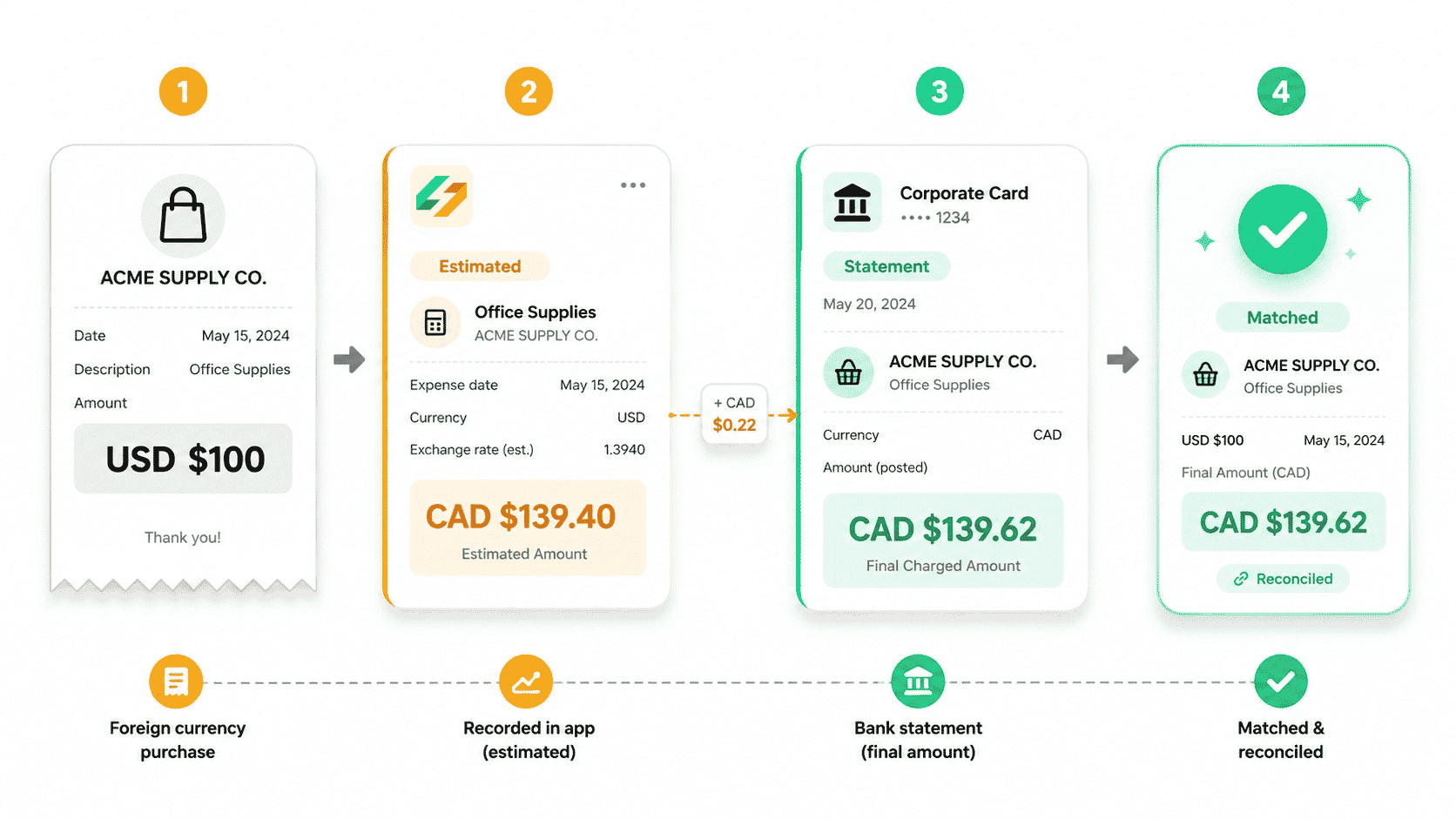
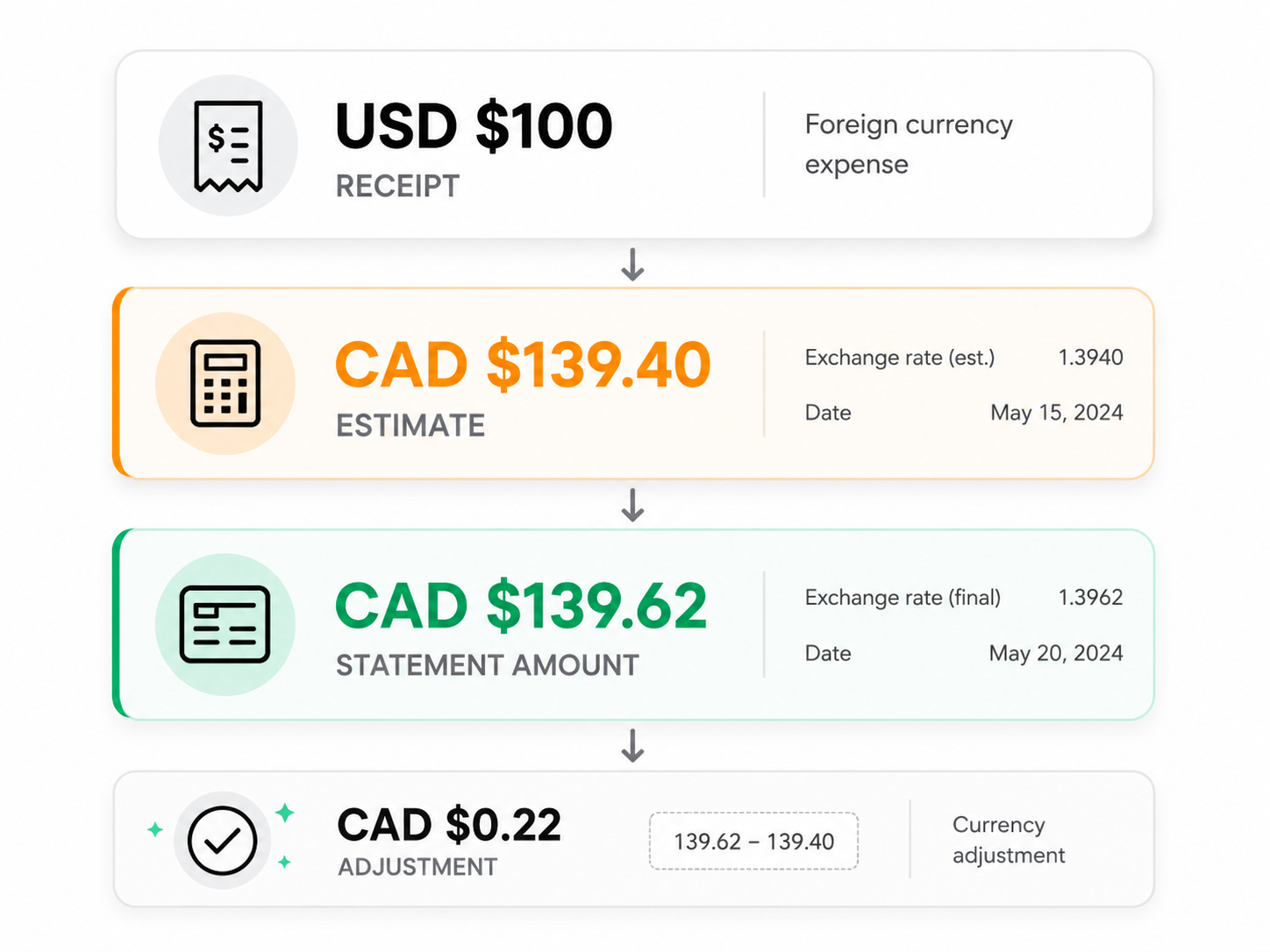
Imagine a business receives a receipt for USD $100.
For this hypothetical example:
- Foreign-currency receipt amount: USD $100
- Daily exchange rate: 1.3600
- Converted amount before surcharge: CAD $136.00
- Configured surcharge: 2.5%
- Initial translated estimate: CAD $139.40
- Amount later shown on the credit card statement: CAD $139.62
The surcharge-adjusted estimate is only CAD $0.22 away from the final statement amount.
When the statement arrives, Spendifique suggests a match between the CAD $139.62 statement transaction and the original USD $100 expense.
After the user reviews and confirms the match, Spendifique adjusts:
- The effective exchange rate recorded for the expense
- The translated home-currency amount
The expense then reflects the CAD $139.62 that was actually charged on the statement.
The original USD $100 receipt amount remains connected to the expense, while its translated value is brought into agreement with the statement.
Step 3: Continue the bookkeeping workflow
You do not need to wait for the statement before processing the expense.
Depending on your organization’s policies, you can continue with activities such as:
- Reviewing and approving the expense
- Categorizing the transaction
- Assigning it to a client, project, class, or location
- Preparing the expense for export
- Processing a supplier payment
- Reimbursing an employee
This is especially useful when an employee or supplier should not have to wait several weeks for a bank statement to become available.
The expense can move forward using the estimated translated amount. When the statement arrives, Spendifique helps you bring the recorded amount into agreement with the actual charge.
Organizations should still follow their own reimbursement and accounting policies when deciding whether to pay from an estimate or wait for the finalized card amount.
Step 4: Upload the bank or credit card statement
When the statement becomes available, upload it to Spendifique.
Spendifique extracts the individual statement transactions and compares them with the receipts and invoices already recorded in the account.
For foreign currency expenses, Spendifique can use the available transaction information to suggest a match even when the translated amount initially recorded on the expense differs from the amount on the statement.
This is important because a strict dollar-for-dollar comparison could miss a valid match.
Instead, Spendifique considers the underlying foreign transaction and the surrounding transaction details when identifying possible matches.
Step 5: Review the suggested match and confirm the adjustment
Spendifique presents the suggested relationship between the original expense and the bank or credit card statement transaction.
You remain in control of the final decision.
Review the suggested match and confirm that the documents represent the same transaction. When you are satisfied, select Match.
With your confirmation, Spendifique adjusts the expense’s effective exchange rate and translated amount to match the amount actually charged on the statement.
For example:
- The source receipt may remain recorded as USD $100.
- The translated amount may change from CAD $139.40 to CAD $139.62.
- The effective exchange rate is adjusted accordingly.
- The expense and statement transaction now agree.
There is no need to manually calculate a replacement exchange rate or edit the translated amount yourself.

What happens to the difference between the estimate and statement?
There will often be a small difference between the initial translated estimate and the amount shown on the statement.
Once the user confirms the match, Spendifique updates the translated amount and effective exchange rate so the expense matches the statement transaction.
This ensures that the expense reflects the amount the bank or card issuer actually charged, rather than continuing to use the placeholder estimate.
The closer your configured surcharge is to your issuer’s normal conversion margin, the smaller the final adjustment is likely to be.
How the difference should ultimately be classified in your accounting records can depend on your bookkeeping setup, reporting currency, jurisdiction, and accounting policy.
For example, your accountant may determine that certain differences should be treated as foreign exchange gains or losses. Confirm the appropriate accounting treatment when necessary.
Is the surcharge the same as a foreign transaction fee?
Not necessarily.
A surcharge configured in Spendifique is used to improve the estimated exchange rate applied when an expense is first recorded. It is not automatically the same thing as a separate foreign transaction fee charged by your card issuer.
Some issuers include their margin within the exchange rate. Others may show a separate fee as another transaction on the statement.
When a foreign transaction fee appears as its own statement line, it may need to be recorded separately from the original expense.
Spendifique’s currency surcharge helps estimate the translated value of the original foreign-currency purchase. It does not replace the need to capture a separate fee when one is charged and presented independently.
When is this workflow most useful?
This estimate-first workflow is especially useful for businesses and bookkeeping firms handling:
- Employee travel expenses
- Foreign supplier invoices
- Software subscriptions charged in another currency
- Cross-border ecommerce purchases
- International advertising expenses
- Foreign hotel and transportation receipts
- Clients with frequent US-dollar credit card transactions
- Businesses that need current expense reporting before month-end
It can also be valuable for bookkeepers managing multiple clients. Instead of tracking which foreign transactions need to be corrected later, they can record each expense when it is received and complete the adjustment through statement matching.
The workflow at a glance
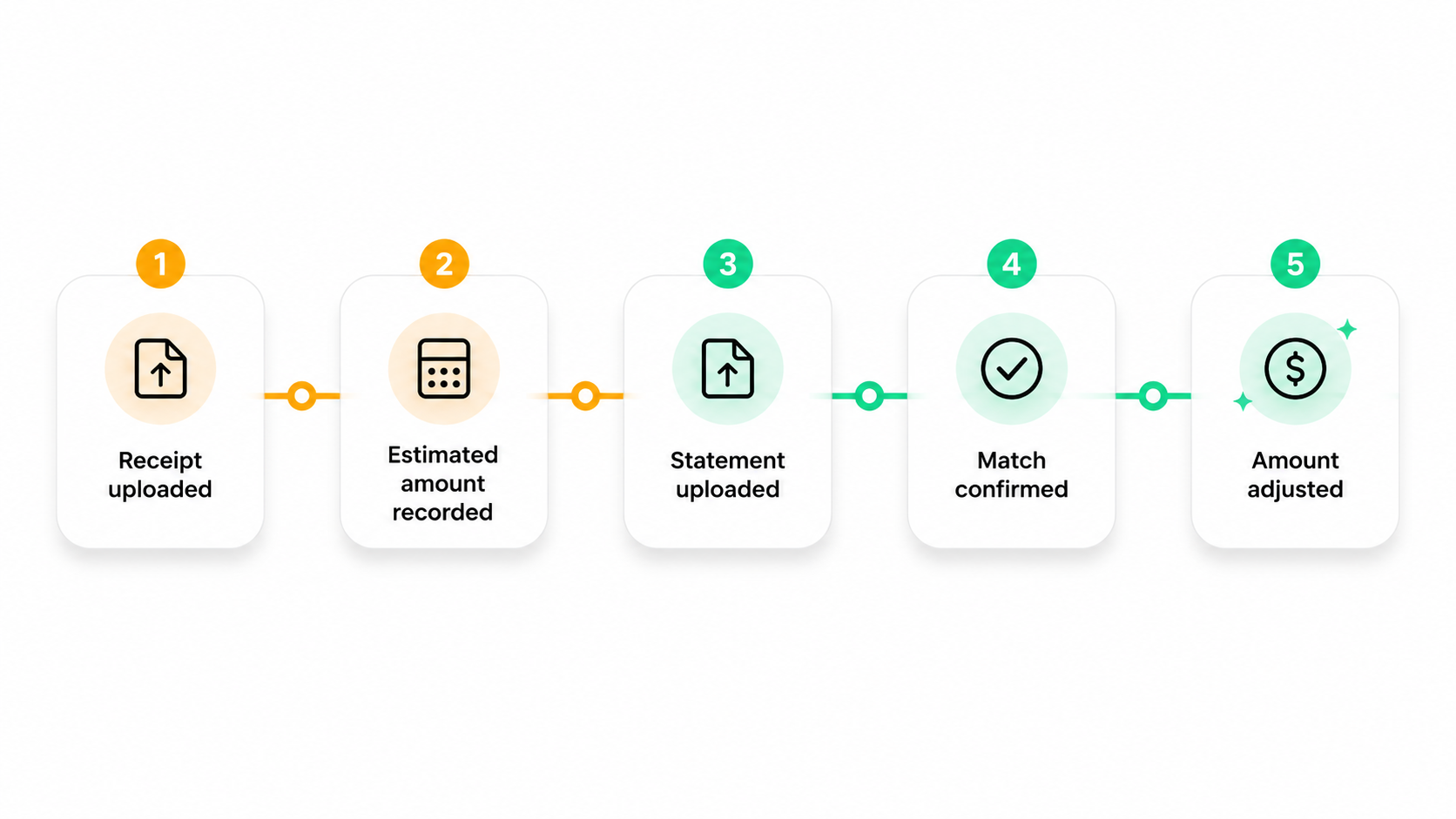
- Upload the foreign currency receipt or invoice.
- Let Spendifique calculate an estimated exchange rate.
- Apply your configured surcharge for a closer translated estimate.
- Continue reviewing, categorizing, approving, paying, or reimbursing the expense.
- Upload the bank or credit card statement when it becomes available.
- Review Spendifique’s suggested transaction match.
- Confirm the match.
- Spendifique adjusts the effective exchange rate and translated amount to match the statement.
You get timely expense records without waiting for the statement and accurate translated amounts without a manual month-end true-up.
Frequently asked questions
What exchange rate should I use before the statement arrives?
You can use a daily exchange rate as an initial estimate. To bring the estimate closer to the amount your issuer is likely to charge, you may also apply a surcharge based on previous statement transactions.
In Spendifique, the surcharge can be configured separately for each currency pair under Settings > Currency.
Why does my bank statement differ from the daily exchange rate?
The final statement amount may be affected by the card network’s rate, the settlement date, the issuer’s conversion margin, and any separate foreign transaction fees.
Because of these factors, the translated amount shown on the statement may differ from an expense recorded using a daily reference rate.
Can Spendifique update the exchange rate after the statement arrives?
Yes. Spendifique can suggest a match between the original expense and the bank or credit card statement transaction.
After the user confirms the match, Spendifique adjusts the effective exchange rate and translated amount so the expense agrees with the amount actually charged on the statement.
Does Spendifique change the original foreign-currency amount?
The original amount from the receipt or invoice remains associated with the expense.
Spendifique adjusts the effective exchange rate and translated home-currency amount to match the corresponding statement transaction after the user confirms the match.
How do I set a currency surcharge in Spendifique?
Go to Settings > Currency, locate the relevant currency pair, select the pencil icon, and enter the surcharge percentage.
Future expenses using that currency pair will be translated using the calculated rate plus the configured surcharge.
Can I set different surcharges for different currencies?
Yes. Surcharges are configured per currency pair.
This allows you to use different assumptions for currencies or payment methods that tend to produce different conversion margins.
Can I reimburse an employee before the statement arrives?
You can record the expense using the estimated translated amount and continue the reimbursement process if that is permitted under your organization’s expense policy.
When the statement becomes available, upload it and confirm the suggested match so the translated expense amount can be adjusted to the amount actually charged.
How do I reconcile a foreign expense to the statement?
Upload the bank or credit card statement to Spendifique. Review the suggested match between the statement transaction and the recorded foreign expense.
After you confirm the match, Spendifique adjusts the effective exchange rate and translated amount to match the statement transaction.
How should I record a separate foreign transaction fee?
When a foreign transaction fee appears as a separate line on the statement, it may need to be recorded as its own expense rather than included in the translated amount of the original purchase.
The correct treatment depends on your bookkeeping setup and accounting policies.
Record now and reconcile accurately later
Foreign expenses should not need to sit unrecorded while you wait for a bank or credit card statement.
With Spendifique, you can capture the receipt immediately, record a surcharge-adjusted estimate, and continue your bookkeeping workflow without delay.
When the statement arrives, Spendifique suggests the matching transaction. After you confirm it, the effective exchange rate and translated amount are automatically adjusted to the amount actually charged.
Start a free Spendifique trial, configure your most-used currency pair, and try the workflow with your next foreign expense.
Start your free trial

.png)