Reconciling a bank or credit card statement by hand can be one of the slowest parts of bookkeeping.
You open the statement, work through each transaction, and search through receipts and invoices to find the supporting document. When something is missing, you stop and ask the client or employee to send it. When a foreign-currency amount does not match the original estimate, you correct it manually.
It is careful and repetitive work, and it can take hours every month.
Spendifique now helps with the document-matching side of reconciliation. Upload a bank or credit card statement, and Spendifique reads the transactions and searches for matching receipts and invoices already in your account.
It suggests the most likely matches for you to review and confirm. For transactions without a document, you can request the missing receipt or create an expense directly from the statement.
This turns much of the reconciliation workflow from searching and data entry into reviewing and confirming.
What does Spendifique’s statement matching feature do?
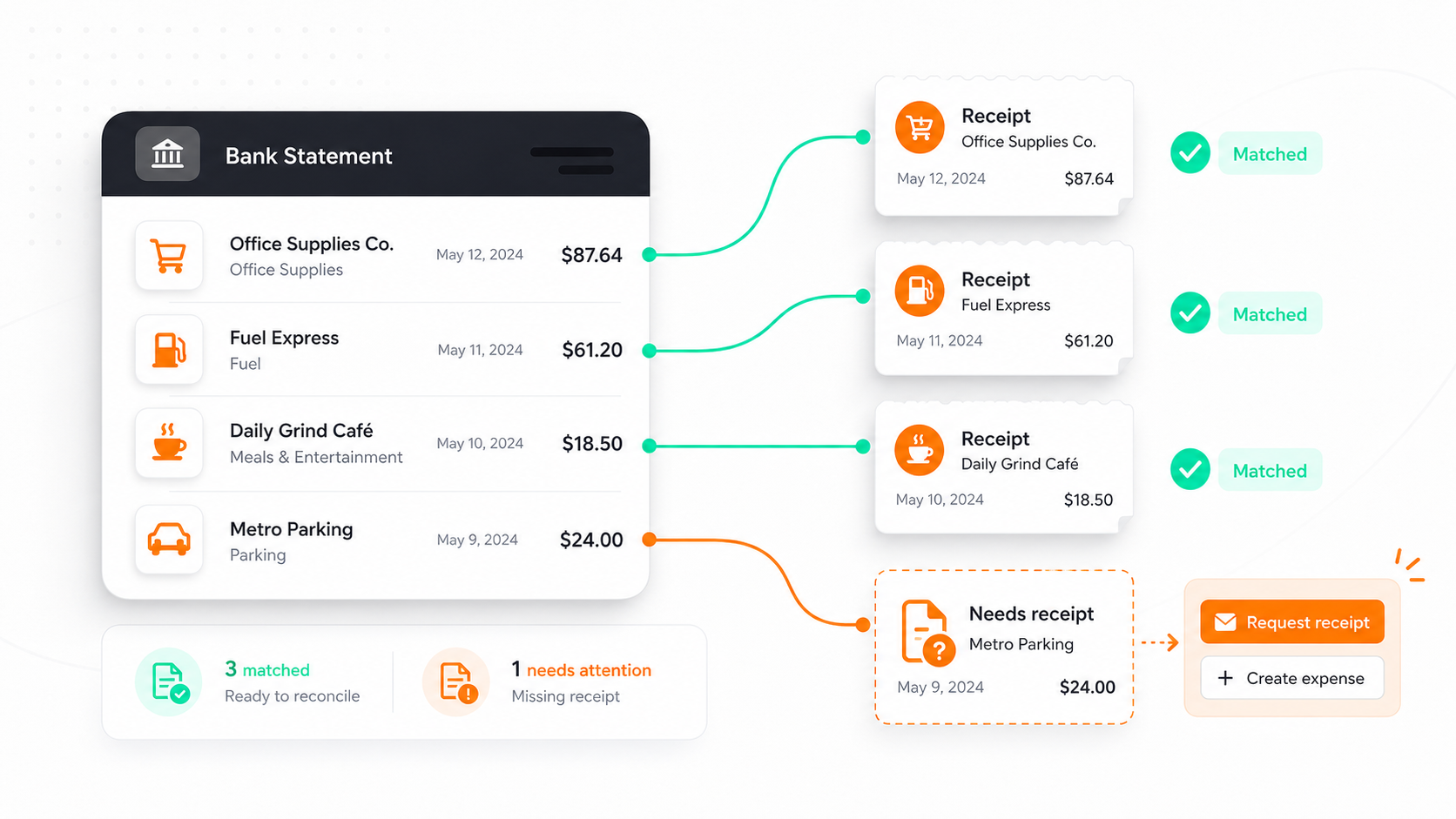
Spendifique reads uploaded bank and credit card statements, identifies the transactions, and searches for matching receipts or invoices already in your account.
From the statement, you can:
- Review and confirm suggested document matches
- Confirm multiple matches in a batch
- Request missing receipts or invoices
- Create expenses directly from statement transactions
- Update foreign-currency expenses to the amount actually charged
- Import statements using PDF or CSV files
You stay in control of every action. Spendifique suggests and prepares the work, but nothing is finalized until you confirm it.
Upload a statement and review suggested matches
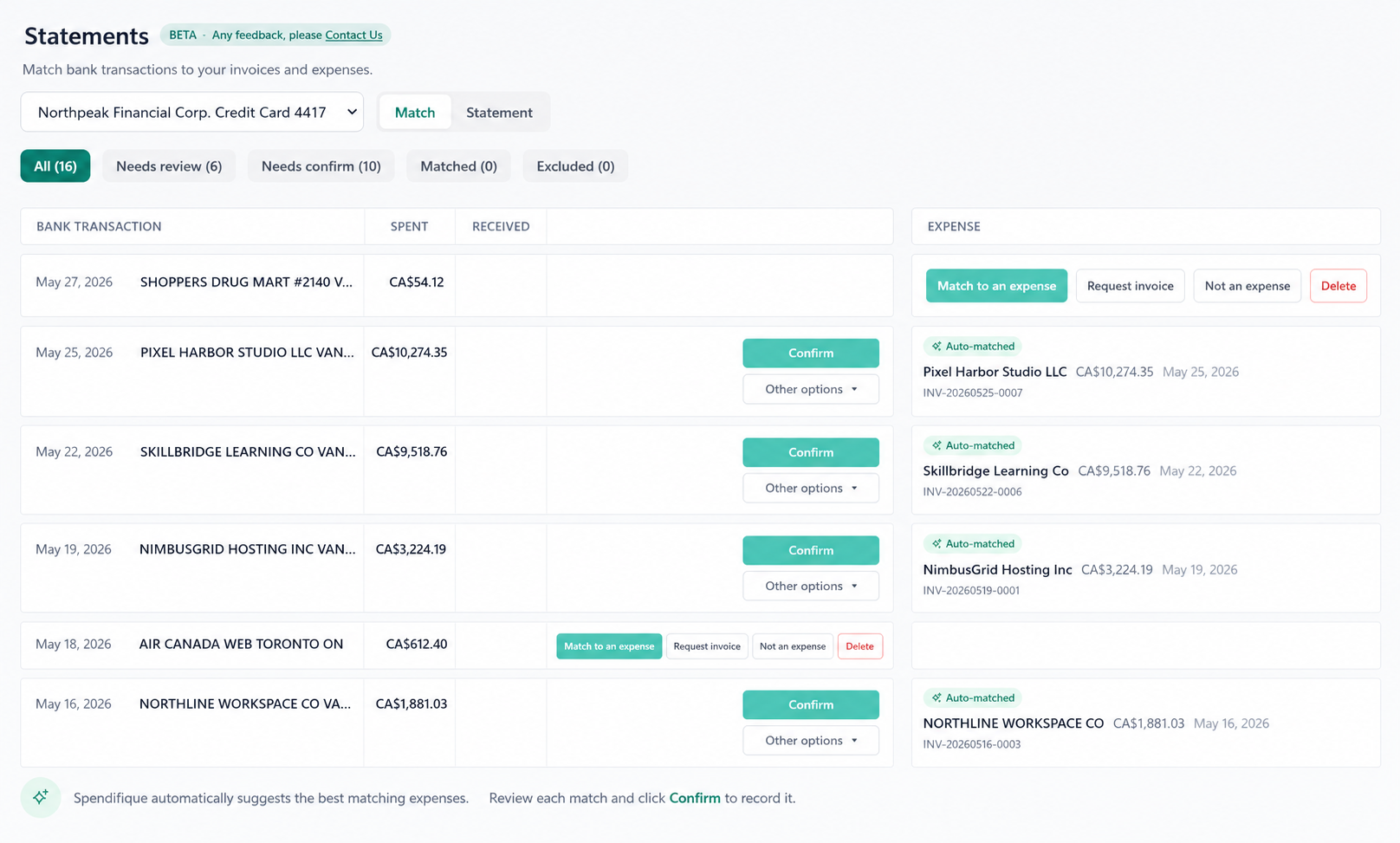
When you upload a bank or credit card statement, Spendifique reads the transactions and looks for the receipt or invoice that belongs to each one.
For every transaction with a likely match, Spendifique suggests the pairing so you can review the result instead of searching through files manually.
You can confirm suggestions individually when you want to inspect the details or confirm multiple matches in a batch when the results are clearly correct.
Nothing is locked in until you approve it.
That means Spendifique does the searching, while you keep control over the final bookkeeping decision.
Foreign-currency transactions can be updated to the amount actually charged
Anyone who records foreign expenses knows the problem.
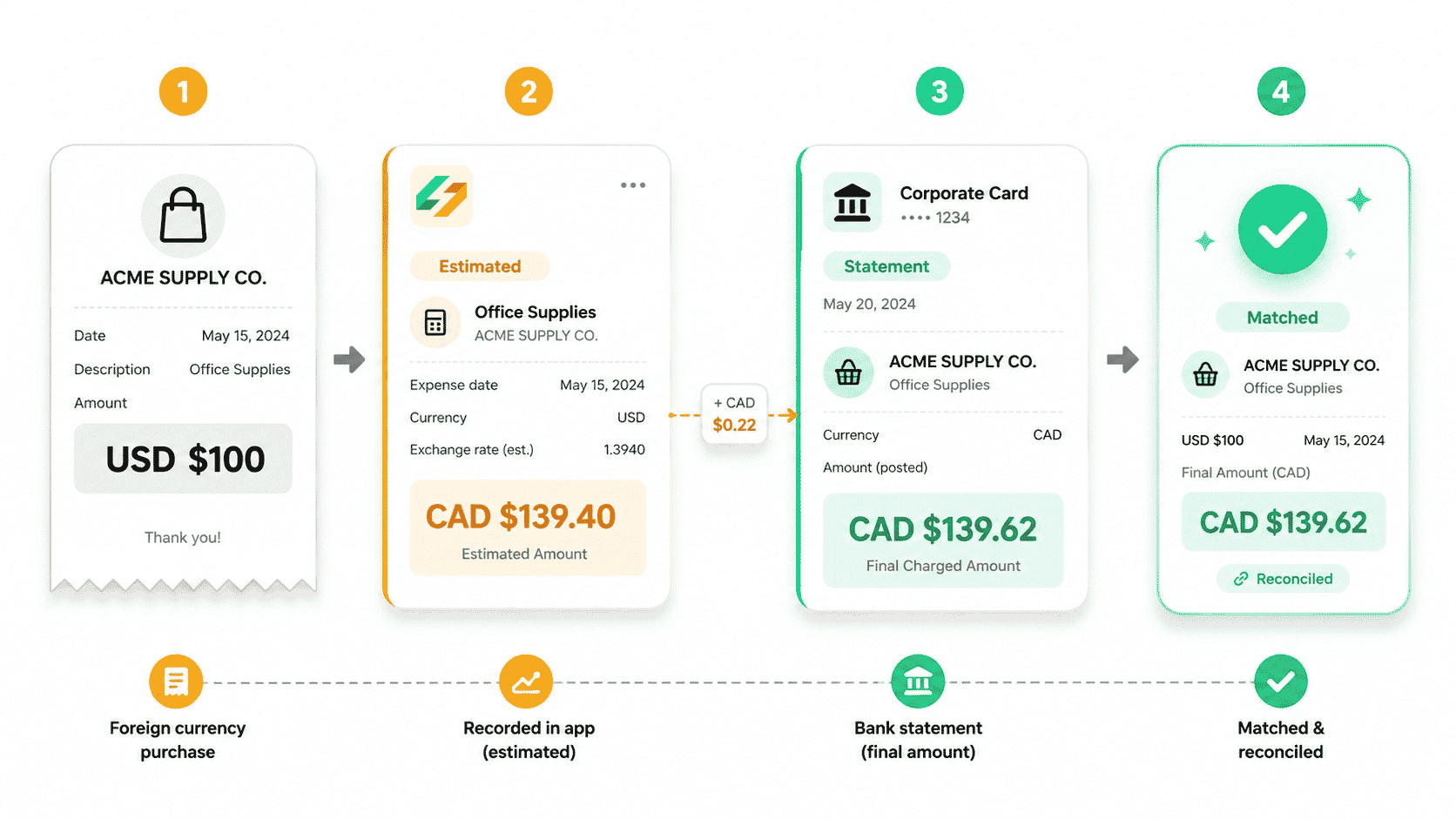
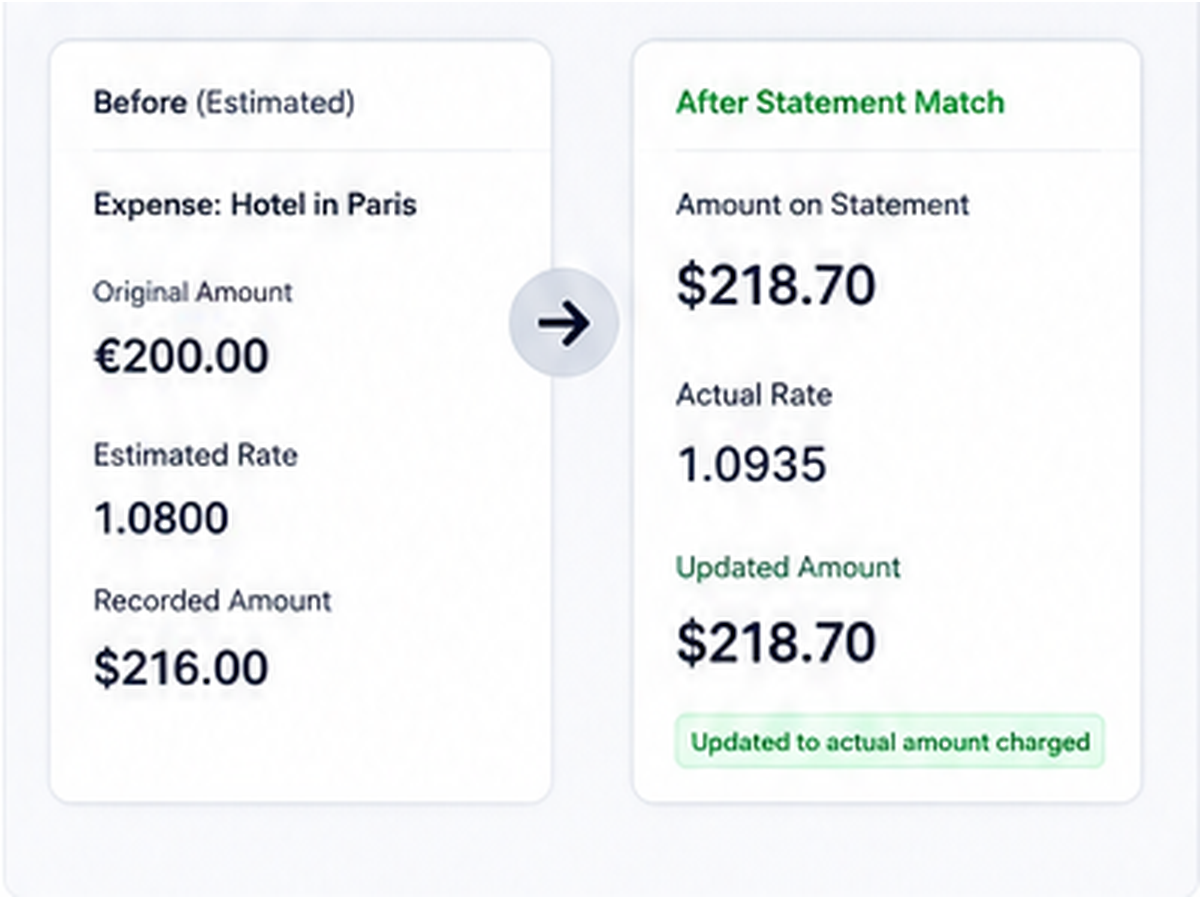
You process an invoice in another currency, but you do not yet know the exact amount the bank or card issuer will charge. The expense is initially recorded using a system exchange rate as an estimate.
When the statement arrives, the translated amount may be slightly different because of the actual exchange rate and any adjustment applied by the bank or credit card provider.
Without automation, someone has to return to the original expense and correct the amount manually.
Spendifique now handles this as part of statement matching.
When Spendifique recognizes a foreign-currency statement transaction, it searches for the related expense in the same way it searches for other matches.
Once you confirm the match, Spendifique can update the translated amount on the expense to the amount actually charged on the bank or credit card statement. It also adjusts the exchange rate associated with the expense so the bookkeeping record reflects the real transaction rather than the earlier system estimate.
This removes one of the most tedious cleanup tasks in multi-currency bookkeeping.
Missing receipt? Request it from the transaction
Reconciliation often stalls because a transaction has no receipt or invoice attached.
Someone made the purchase, but the supporting document never reached the bookkeeper. The bookkeeper then has to work out who made the purchase, send a reminder, and keep track of whether the document was eventually received.
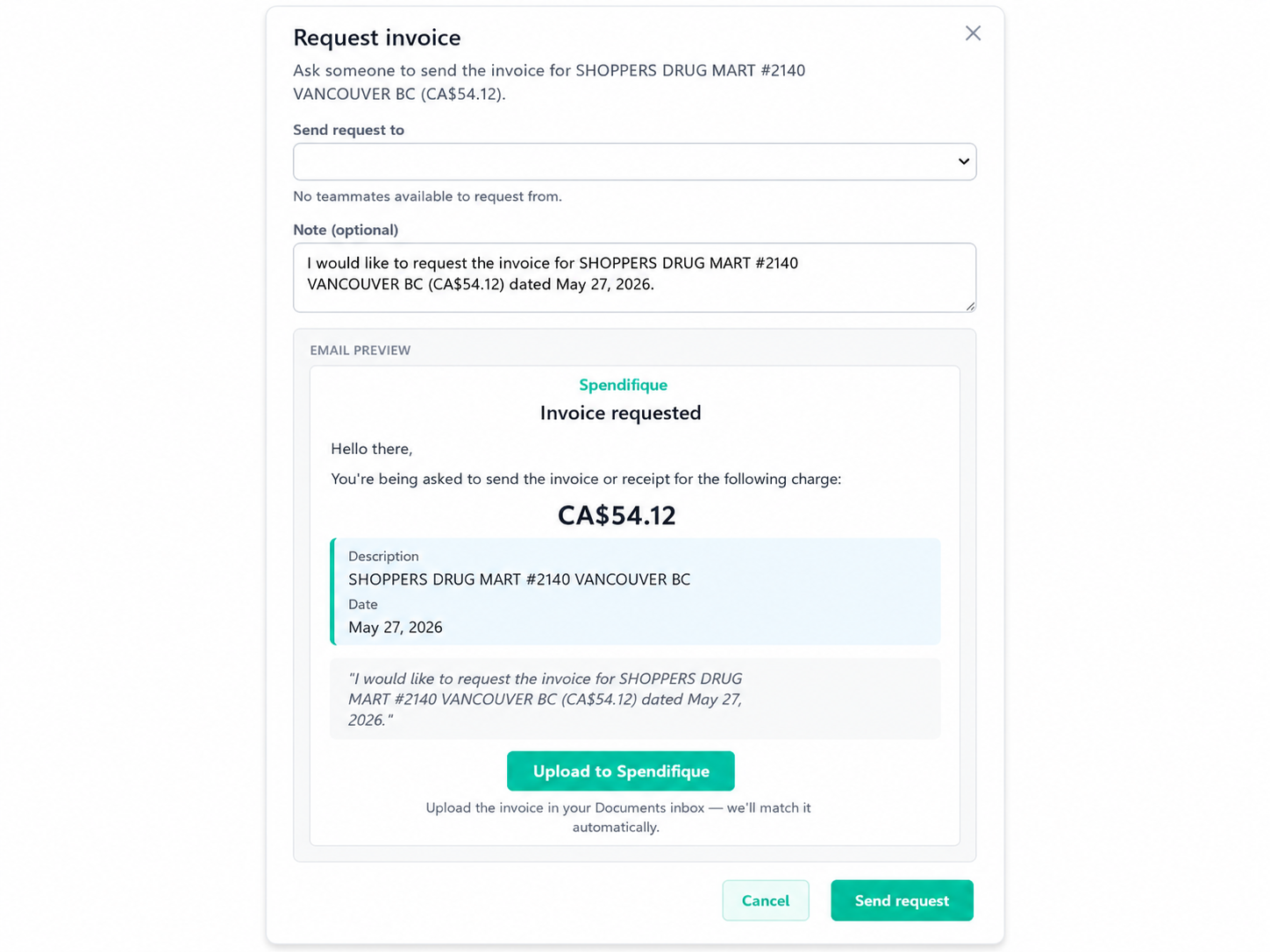
Spendifique lets you request the missing document directly from the statement transaction.
Select the transaction, choose the responsible user, and request the related receipt or invoice. The user is notified in the app and by email with a clear request for the specific document.
The request stays connected to the transaction, so the bookkeeper does not have to manage the follow-up separately through email, messages, or memory.
Create expenses directly from statement transactions
Not every bank or credit card transaction needs to be matched to an uploaded receipt or invoice.
Some bookkeepers have access to the supporting documents but do not need to store them in their expense capture software. Year-end accountants may also need to record transactions from a client’s statements without collecting and uploading every individual document.
Spendifique now lets you create expense entries directly from bank and credit card statement transactions.
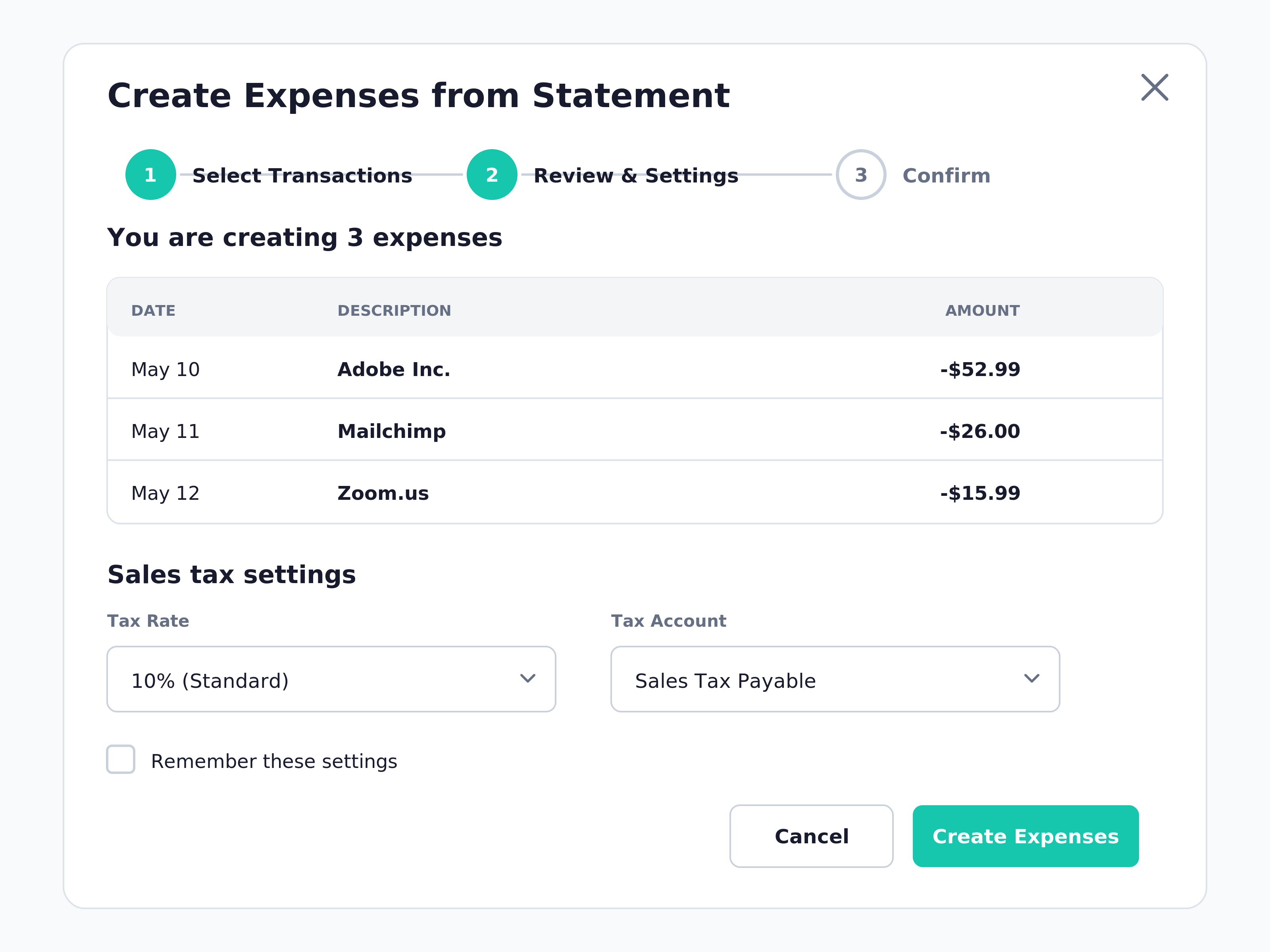
You can select one transaction and create an individual expense, or select several transactions and create the expenses in a batch.
After you make your selection, Spendifique opens a review window where you can confirm how the transactions should be recorded before they are added to Expenses.
This can be useful for transactions such as:
- Bank fees
- Software subscriptions
- Utilities
- Insurance payments
- Recurring charges
- Straightforward operating expenses
- Year-end transactions being recorded from client statements
You still decide whether a supporting document should be collected and stored. Spendifique simply gives you a faster option when the statement contains enough information to record the expense.
Record sales tax when creating expenses from a statement
If sales tax tracking is enabled for the account, Spendifique can also help record the tax when you create expenses from statement transactions.
After selecting the transactions, you can enter the tax settings or confirm the settings used the last time you used the feature.
Spendifique then uses those settings to calculate and record the appropriate tax on the new expense entries.
This is particularly useful for bookkeepers and year-end accountants who know how the transactions should be treated but do not need to upload every receipt or invoice into the system.
A new Documents section that sorts files for you
Alongside statement matching, we rebuilt how documents enter Spendifique.
There is now a section called Documents, where you can upload:
- Bank statements
- Credit card statements
- Invoices
- Receipts
- Files containing a mix of document types
You do not have to sort the files first or decide which part of Spendifique they belong in.
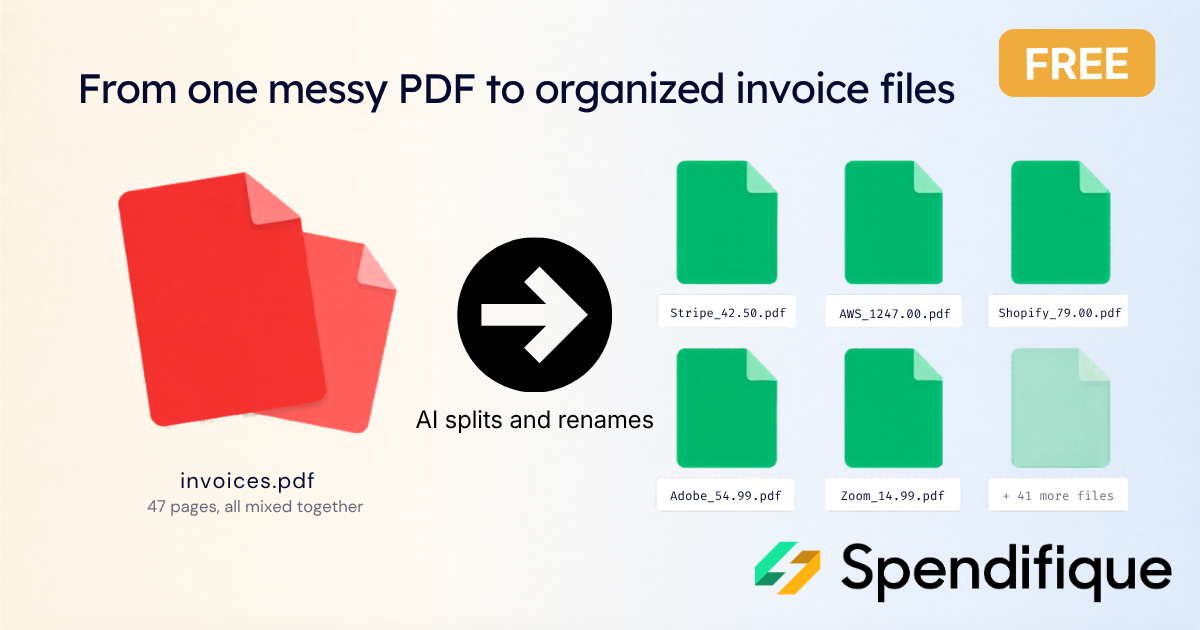
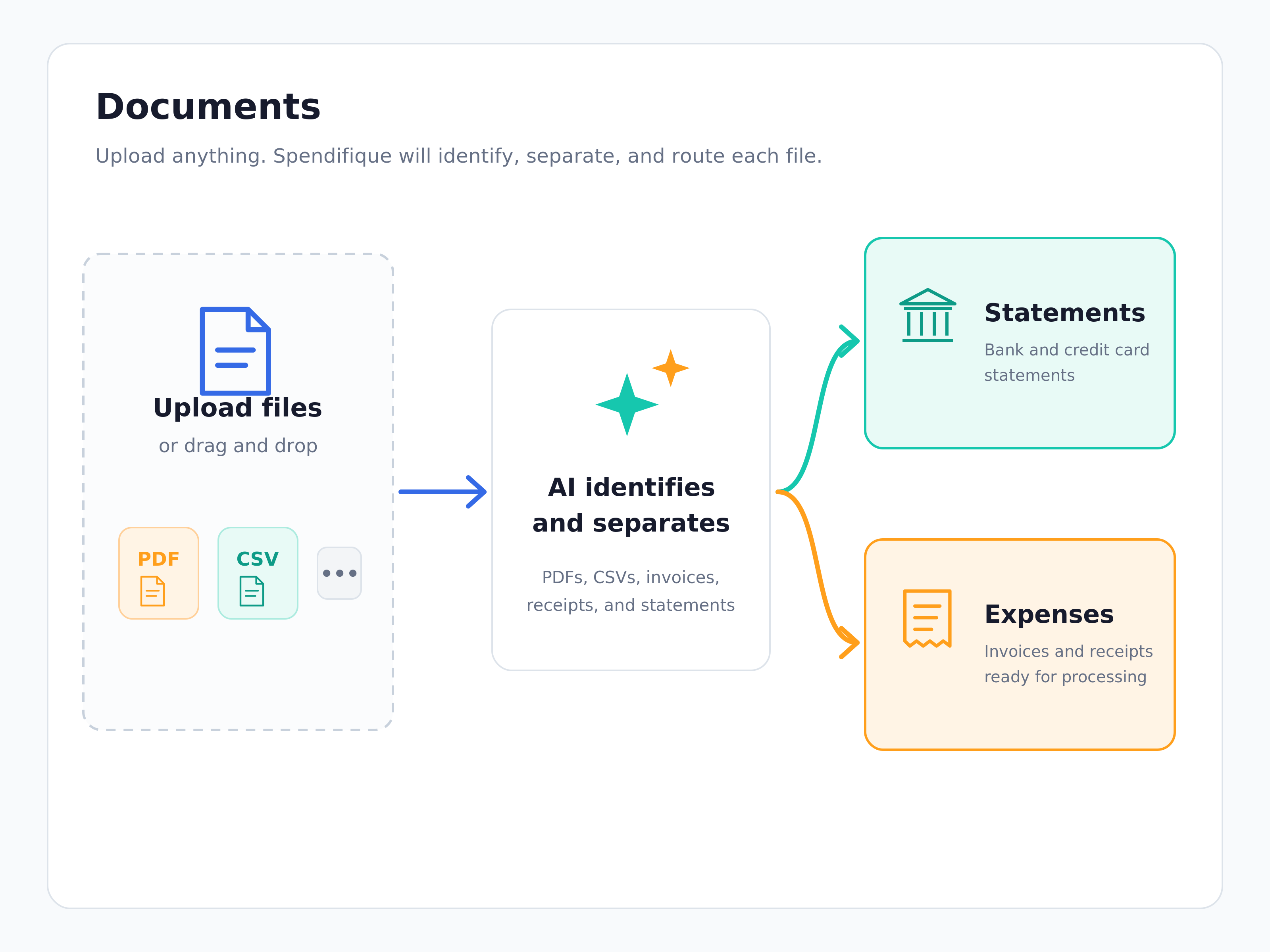
Spendifique uses AI to read what you uploaded, identify the document type, and determine whether a file needs to be separated into multiple documents.
It then routes each item to the appropriate workflow.
Bank and credit card statements go to the Statements section. Invoices and receipts go to Expenses for processing.
This builds on Spendifique’s ability to split multi-invoice PDFs into separate invoices, but extends the same approach across the different financial documents you handle.
Upload files in bulk and monitor the queue
You can also upload a large number of files at once.
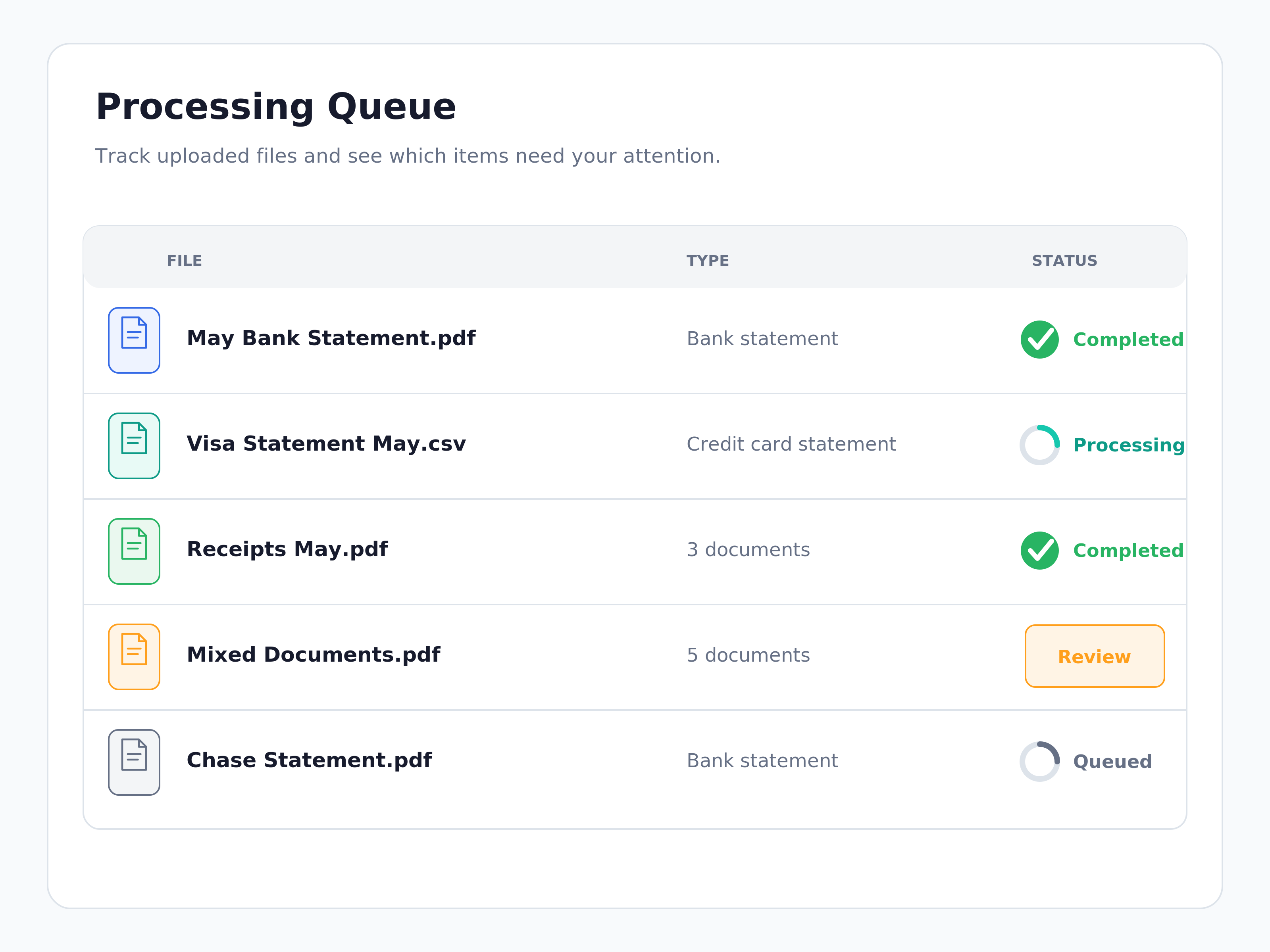
Spendifique places the files into a processing queue and shows the progress of each one as it moves through the system.
The queue also highlights files that need your input.
Instead of failing quietly or leaving you to work out what happened, Spendifique shows when a decision is required before processing can continue.
For example, the first time you upload a statement from a new bank or credit card provider, Spendifique may ask you to review and add details such as:
- The bank or credit card provider’s name
- The related general ledger account
- Other settings needed to process future statements correctly
Once those details are set up, future statements from the same source can move through the workflow without asking you to enter the same information again.
Upload bank and credit card statements as PDF or CSV files
Spendifique supports official bank and credit card statements uploaded as PDFs, as well as transaction data imported through CSV files.
Once the transactions are in Spendifique, you can:
- Match them to existing receipts and invoices
- Confirm suggested matches
- Request missing documents
- Create new expenses directly from the statement
- Apply sales tax settings when creating expenses
- Update foreign-currency expenses to the amount actually charged
Direct bank connections are not yet available, but they are planned for a future release.
The goal is to support different bookkeeping workflows rather than forcing every transaction through the same process.
You can match supporting documents when they are needed, create expenses directly when they are not, and decide how each transaction should be handled.
Why this matters for month-end and year-end bookkeeping
Two of the most repetitive bookkeeping tasks are reconciling statements and collecting the documents behind each transaction.
Both have traditionally required careful, line-by-line work.
Spendifique now reads bank and credit card statements, suggests matches to existing receipts and invoices, corrects foreign-currency expenses to the amount actually charged, and lets you request missing documents without leaving the transaction.
When a receipt or invoice does not need to be uploaded, you can create the expense directly from the statement, either individually or in a batch.
If sales tax tracking is enabled, Spendifique can also calculate and record the tax based on the settings you confirm.
This gives you more than one way to handle an unmatched transaction.
You can:
- Match it to an existing document
- Request the missing document
- Create an expense directly from the statement
- Leave it for later review
For bookkeeping firms and solo bookkeepers, that can mean fewer hours spent searching for documents and entering transactions manually.
For year-end accountants, it provides a practical way to build expense records from the bank and credit card statements already available.
For business owners doing their own bookkeeping, it removes another repetitive task from the monthly close.
Spendifique can then sync the processed data to QuickBooks or help you maintain clean bookkeeping records in Google Sheets, so the work does not remain trapped in a separate tool.
Frequently asked questions
How do I match bank statement transactions to receipts in Spendifique?
Upload a bank or credit card statement as a PDF or CSV file. Spendifique reads the transactions and searches for receipts or invoices already in your account that may belong to them. You can review and confirm the suggested matches individually or in a batch.
Can Spendifique process credit card statements as well as bank statements?
Yes. Spendifique supports both bank statements and credit card statements. The transactions can be matched to existing documents, used to request missing receipts, or converted directly into expense entries.
Can I create an expense from a statement transaction without uploading a receipt?
Yes. You can select a bank or credit card statement transaction and create an expense directly from it. This is useful when the supporting document is stored elsewhere or when the statement contains enough information to record the expense.
Can I create several expenses from a statement at once?
Yes. Select multiple transactions and choose to create expenses from them in a batch. Spendifique opens a review window where you can confirm the settings before the expenses are created.
Can Spendifique record sales tax when creating expenses from a statement?
Yes. If sales tax tracking is enabled, you can enter the tax settings or confirm the settings used the last time you created expenses from statement transactions. Spendifique then uses those settings to calculate and record the tax.
How does Spendifique handle foreign-currency transactions?
When Spendifique identifies a likely match between a statement transaction and a foreign-currency expense, you can confirm the match. Spendifique can then update the translated expense amount to the amount actually charged by the bank or card issuer and adjust the associated exchange rate.
How do I request a missing receipt from someone on my team?
Select the statement transaction and request the related document. Choose the responsible user, and Spendifique sends them an in-app and email notification tied to the specific transaction.
What statement file types does Spendifique support?
Spendifique supports official bank and credit card statements uploaded as PDFs, as well as statement transaction data imported through CSV files.
Does Spendifique connect directly to bank accounts?
Not yet. Direct bank connections are planned for a future release. Statements can currently be uploaded as PDF or CSV files.
Do I have to sort statements and receipts before uploading them?
No. You can upload statements, receipts, invoices, and mixed files through the Documents section. Spendifique identifies the document type, separates files when necessary, and routes each item to the appropriate area.
Do I have to create an expense for every unmatched statement transaction?
No. You decide how each transaction should be handled. You can match it to an existing document, request a missing receipt or invoice, create an expense directly, or leave it for later review.
Try it on your next statement
Upload your next bank or credit card statement and let Spendifique search for matching receipts and invoices.
For anything that is missing, request the supporting document or create an expense directly from the statement. You can work through transactions individually or process several at once, while keeping control over every match and accounting decision.
Start your free trial and turn your next reconciliation into a review instead of a search.

.png)